How to Monitor Your Content-Security-Policy
Along with uptime, response time, and content correctness, security is one of the core areas to test as a part of a robust monitoring policy. Recently, we shipped a new set of checks for monitoring your website: Content-Security-Policy (CSP).
The funny thing is that we had no CSP of our own, so we had to implement one. But adding a strong CSP is not easy. Before we could enforce any policy, we needed to gather more data. We started by mapping what resources our site actually loads and flagging where policy enforcement would be tricky down the road.
First, we bootstrapped a permissive report-only policy using csp-toolkit, deployed a Content-Security-Policy-Report-Only header, and collected violations over a few days. Then we used our own CSP checks to monitor the header as we iterate towards enforcement.
If you’re starting from zero, like us, report-only is where you begin. After the reporting header is deployed and you’ve begun to collect and analyze the violations it detects, adding a CSP check is what catches the policy breaking after you ship it.
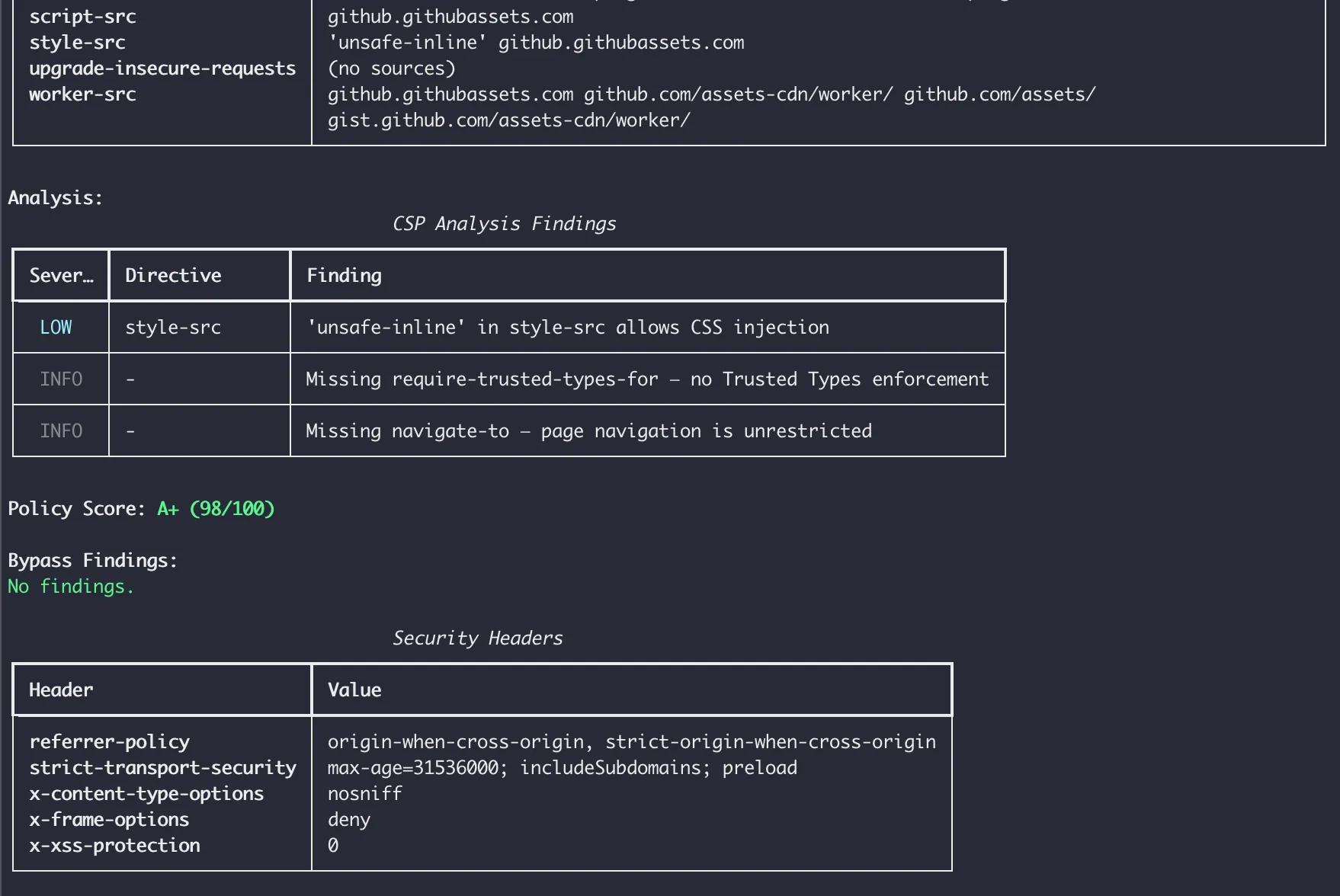
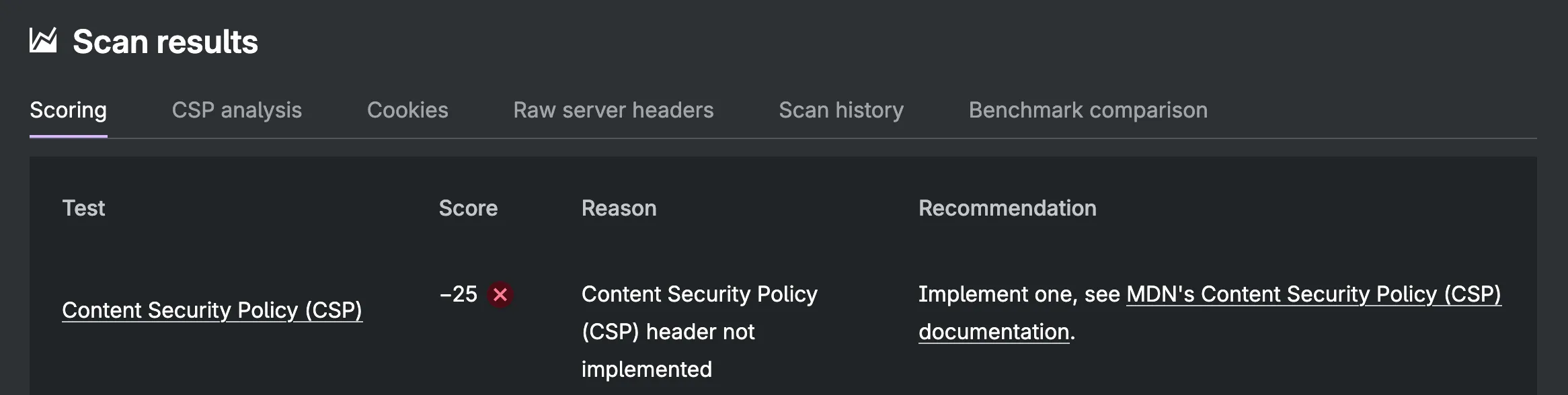 MDN’s HTTP Observatory Report on testomato.com’s initial CSP
What is Content Security Policy?
A Content-Security-Policy tells the browser which sources a page is allowed to load resources from. It can restrict JavaScript, stylesheets, images, fonts, iframes, web workers, form submissions, navigation targets, and embedded objects. Its primary purpose is to mitigate cross-site scripting (XSS) attacks by preventing browsers from executing injected code. It also defends against clickjacking via the frame-ancestors directive, and can enforce HTTPS upgrades via upgrade-insecure-requests.
CSP extends the browser’s same-origin policy — which already restricts how pages interact with other origins — by giving developers explicit control over resource loading per directive and per origin.
A minimal policy might look like:
Content-Security-Policy: default-src 'self'This tells the browser to only load resources from the same origin as the page. Any attempt to load a script from an external source — or inject an inline script — will be blocked.
CSP can also be deployed as an HTML meta tag, which can be useful when you cannot deploy your own headers, but the meta tag has some limitations: it doesn’t support report-only mode, violation reporting endpoints, or some other directives like frame-ancestors or sandbox.
<meta http-equiv="Content-Security-Policy" content="...">For our use case, logging without enforcement via the Content-Security-Policy-Report-Only response header allows us to gather violation data without breaking our application’s functionality.
Directives and common values
CSP is made up of directives, each controlling a different resource type. A few key categories include:
- Fetch directives — control where resources can load from:
default-src,script-src,style-src,img-src,connect-src,font-src,frame-src,object-src - Document directives — control the document environment:
base-uri - Navigation directives — control where the page can navigate or be embedded:
frame-ancestors,form-action
Common directive values:
'self'— same origin only (scheme + hostname + port)'none'— nothing allowed'unsafe-inline'— allows inline scripts and styles (significantly weakens CSP)'unsafe-eval'— allowseval()and similar dynamic code execution- A specific origin:
https://cdn.example.com
When a directive isn’t specified, it falls back to default-src. More specific directives always take precedence. If script-src is defined, it governs scripts regardless of what default-src says. If a server sends multiple Content-Security-Policy headers, both apply and the stricter value wins for any duplicated directives.
Content Security Policy Report Only
Content-Security-Policy-Report-Only behaves identically to the enforced header, except the browser observes without enforcing. Resources that would be blocked under enforcement are allowed to load, but violations are reported to your browser console and, if configured, to a reporting endpoint.
This makes it the safe path to deploying CSP for the first time. You deploy report-only, watch what fires, refine the policy, and switch to enforcement once you’re confident you’ve captured all legitimate sources.
MDN’s CSP guide covers the full directive reference. For nonce-based and hash-based strict CSP — the recommended approach, preferred over allowlists — see web.dev’s guide to mitigating XSS with a strict policy.
Why CSP matters
XSS was ranked #1 by MITRE and CISA as the top threat of 2025 — 7,303 vulnerabilities logged in a single year. In the 15 years of data going back to 2010, XSS has never ranked outside the top four. CSP is one of the few mechanisms that can significantly reduce the risk of this class of attack.
In the 2018 Newegg breach, attackers injected a card-skimming script that harvested payment data for 35 days. A connect-src policy would have blocked the exfiltration request to the attacker’s domain, even if the injected script had run.
CSP adoption is rising but policy quality varies
According to the Web Almanac, 21.9% of pages had a CSP header in 2025 — up from 18.5% the year before. That’s a healthy increase, but the growth should be contextualized by what those policies actually contain: 92% of CSP implementations use unsafe-inline in script-src, and 77% use unsafe-eval. Both keywords significantly reduce the XSS protections CSP exists to provide (though unsafe-inline is ignored when strict-dynamic is present).
Google Tag Manager is the most common allowed host in CSP headers, appearing in 0.74% of desktop CSPs. GTM and analytics tools require scripts loaded from external sources, and the path of least resistance is to add unsafe-inline or a permissive wildcard rather than wrestle with nonces. Other commonly loaded HTTPS origins include resources for ads and fonts.
For most sites with a CSP, the header significantly reduces — but doesn’t completely eliminate — XSS exposure. Although difficult to implement, a strict policy using nonces or hashes provides stronger protection.
Why monitoring CSP matters
CSP requires ongoing maintenance. Third-party scripts get updated, CDN domains change, and new deployments can break or weaken a policy without anyone noticing.
Monitoring the header doesn’t replace violation reporting. Instead, it keeps you informed if the header changes, disappears, or includes a value you didn’t expect.
How Testomato monitors CSP
Testomato’s CSP support is built around two check types.
-
Content-Security-Policy checks the full value of the
Content-Security-Policyheader as a string. You can check for presence, absence, an exact match, or a regex pattern. To verify the header is present, usematches patternwith.*. -
CSP: <directive> checks extract a specific directive from the policy and test its value independently. For example, CSP: script-src gives you just the
script-srcvalue to test against, which is useful for verifyingunsafe-inlineisn’t present without caring about the rest of the policy.
Supported directives: default-src, script-src, style-src, img-src, font-src, connect-src, frame-src, frame-ancestors, form-action, base-uri, object-src, media-src, worker-src, manifest-src, upgrade-insecure-requests.
Limitations worth knowing
Three things Testomato’s CSP checks don’t do:
-
No preset for report-only. The Content-Security-Policy check doesn’t recognize
Content-Security-Policy-Report-Only— if a site only has the report-only header, the preset fails with “Missing” as if no policy exists at all.However, there’s a workaround: an HTTP Response Header check with
matches patterncan targetContent-Security-Policy-Report-Onlydirectly by anchoring the regex to its name. This lets you monitor a report-only policy the same way, before you’ve deployed (or while you’re still refining) the enforced header.
-
No policy analysis. Testomato checks string presence or absence but it doesn’t evaluate policy strength. You can verify that
unsafe-inlineisn’t inscript-src, but you can’t assess whether the overall policy is actually effective. For that, use CSP Evaluator. -
No violation reporting. These checks monitor the header, not what the browser blocks or reports. They’re complementary to a violation reporting service like Report URI, not a replacement.
Checking Google vs GitHub CSP
We ran Testomato CSP checks on two sites with different approaches to CSP: Google (report-only, nonce-based) and GitHub (enforced, strict allowlist).
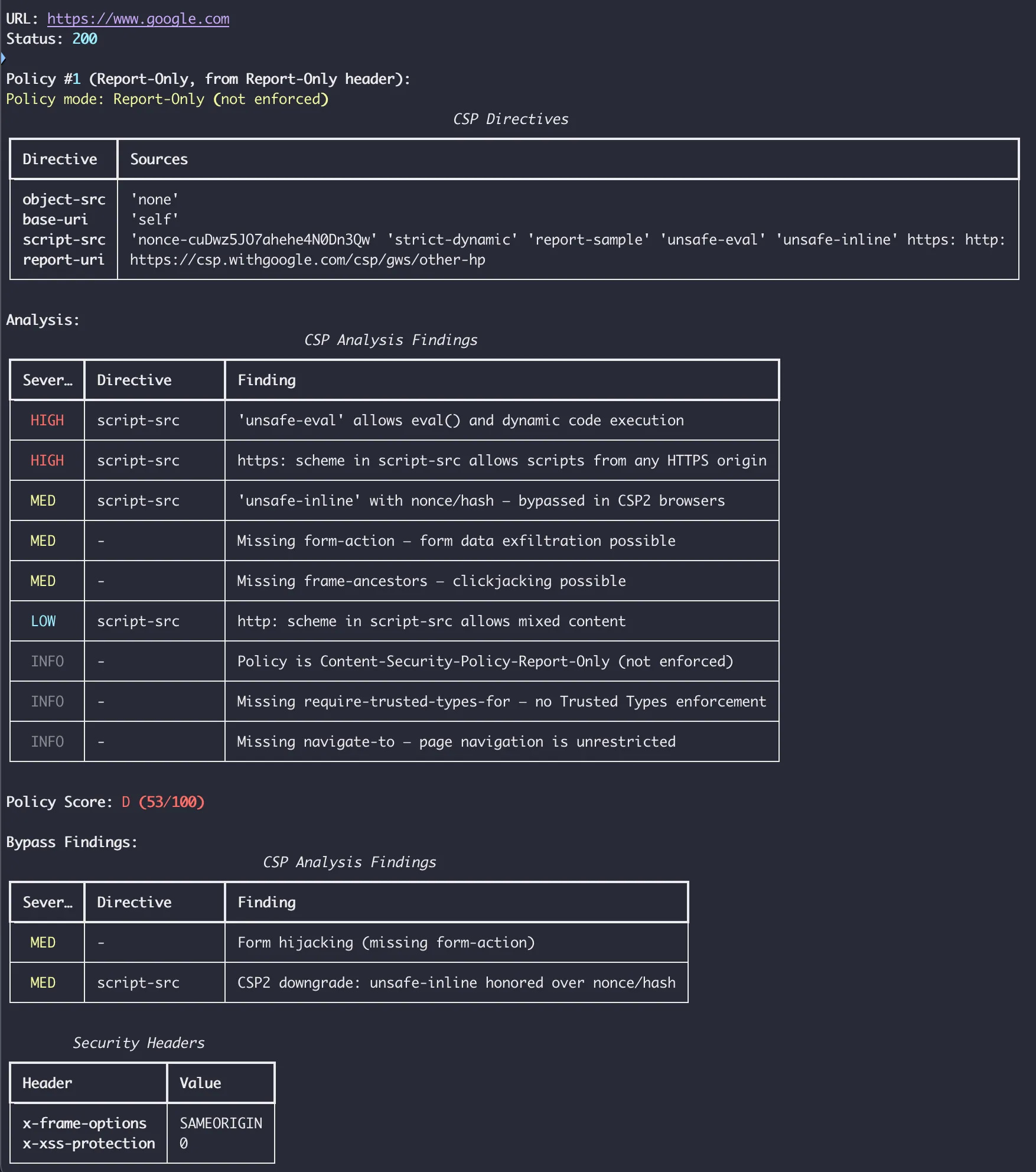
Google uses Content-Security-Policy-Report-Only with a nonce-based policy that reports violations to csp.withgoogle.com. In DevTools, the header is visible along with the console warnings the policy generates.

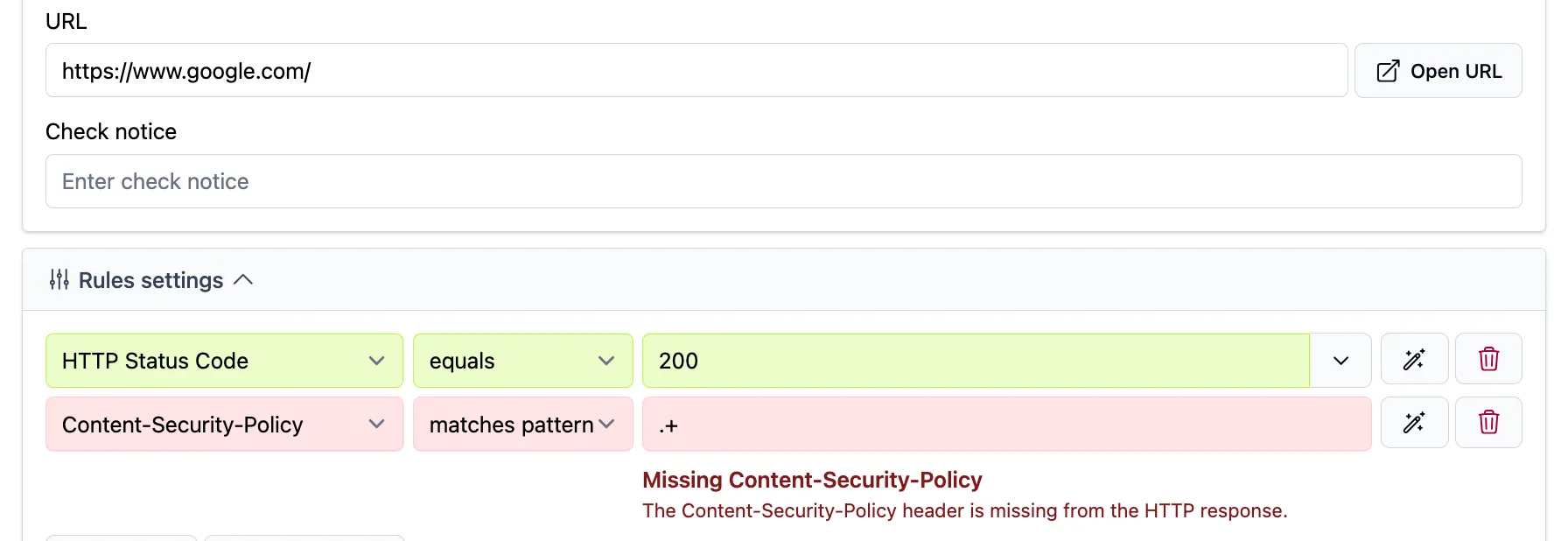
When we ran a Testomato Content-Security-Policy presence check on Google, it came back “Missing”, because Testomato checks Content-Security-Policy, not Content-Security-Policy-Report-Only. Google has a policy; Testomato just can’t see it yet.
csp-toolkit’s analysis of Google’s report-only policy scores it 53/100 (grade D): unsafe-eval present, a broad https: wildcard in one directive, missing form-action, and missing frame-ancestors. The https: wildcard is the most significant finding — it allows resources to load from any HTTPS origin, which undermines the allowlist model. unsafe-eval weakens script-src, and the missing form-action and frame-ancestors leave form submission targets and iframe embedding unrestricted.
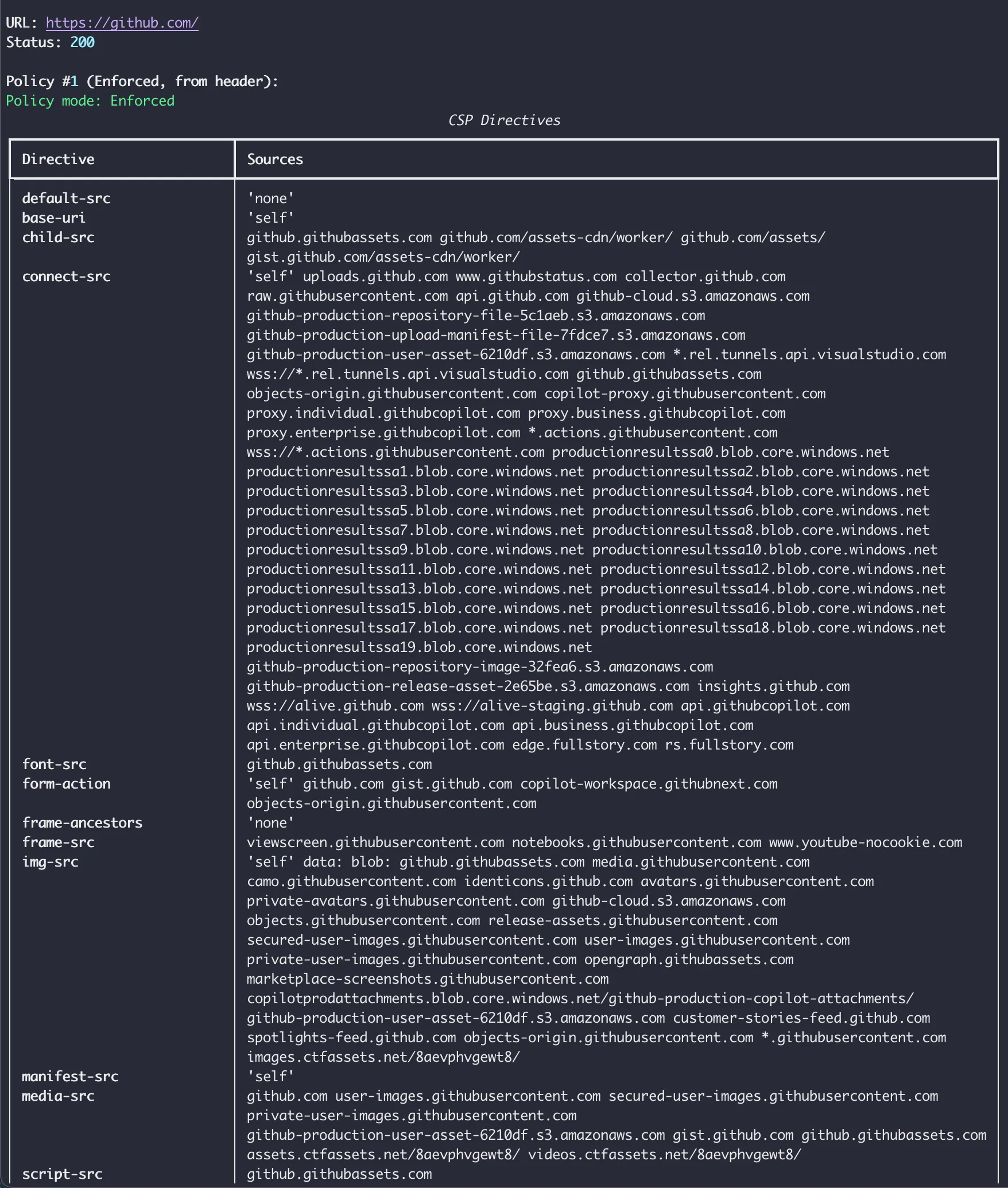
GitHub
GitHub has a fully enforced CSP with a strict allowlist. csp-toolkit rates it 98/100 (grade A). The only significant findings are unsafe-inline in style-src and a missing explicit object-src. unsafe-inline in style-src allows arbitrary CSS injection — lower risk than script injection, but CSS attribute selectors can exfiltrate data like CSRF tokens without any JavaScript.
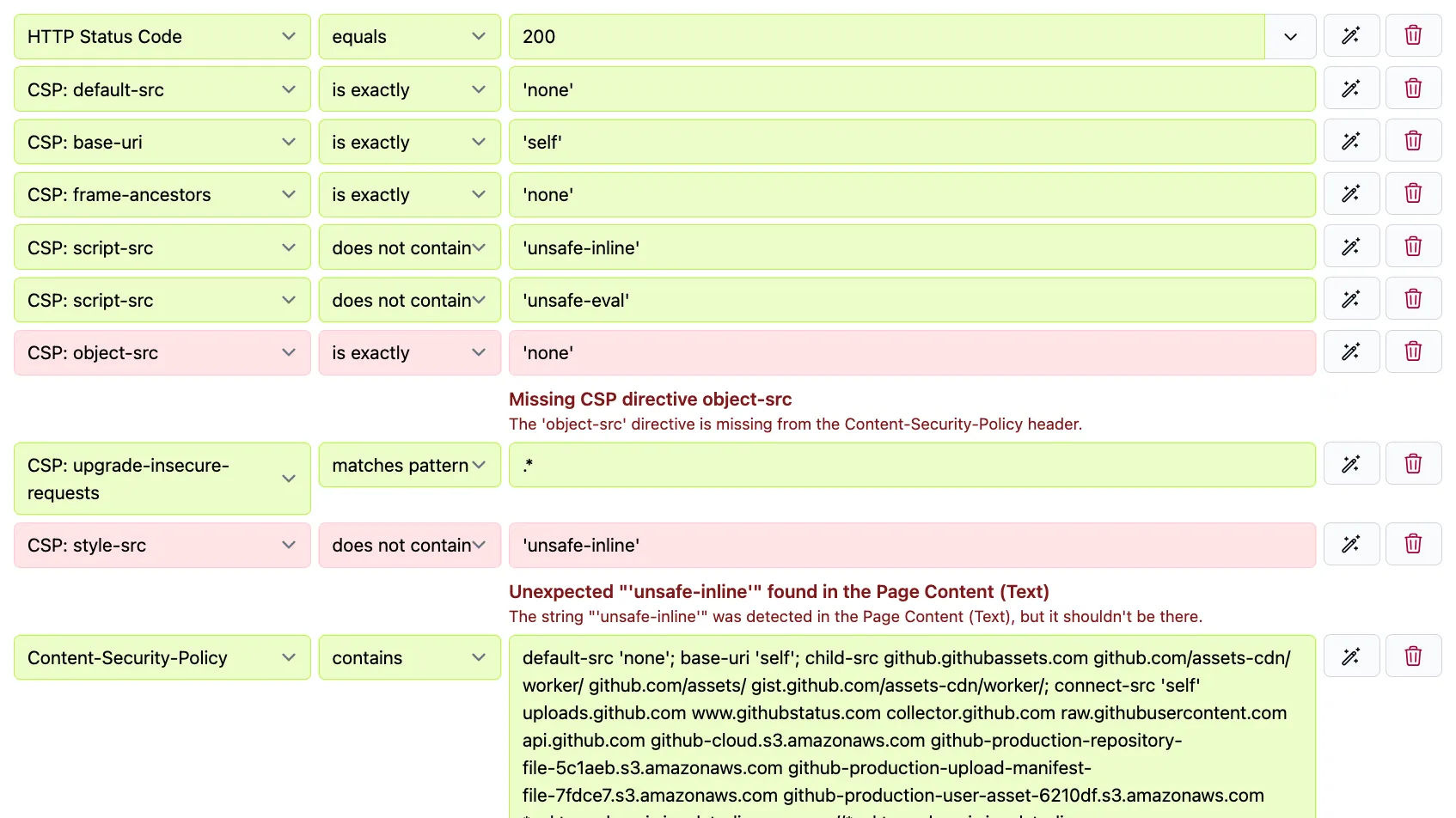
Our Testomato checks on GitHub mostly pass, with a couple intentional failures for informational purposes.
-
object-src: This directive controls<object>and<embed>elements — legacy HTML used for Flash and Java applets. MDN recommends setting it to'none'on modern sites. GitHub doesn’t set it explicitly, but it falls back todefault-src, which is restrictive. csp-toolkit doesn’t flag it because an absent directive with a safe fallback isn’t a security concern. Our check fails because the directive isn’t present, but GitHub isn’t insecure. Still, adding the check provides information that could be used to make a minor improvement to the policy according to a documented best practice. -
base-uri: Thebase-uridirective restricts which URLs can appear in a<base>element. Without it, an attacker who can inject<base href="https://attacker.com/">into a page can hijack relative script loads even whenscript-src 'self'looks correct (an often overlooked attack vector). GitHub sets it; our check confirms it. -
style-src: Our check forunsafe-inlineabsent instyle-srcfails, which matches the csp-toolkit finding above. GitHub uses'unsafe-inline'instyle-srcfor practical reasons (likely inline styles from third-party tooling), and it’s the one finding that keeps the policy off a perfect score.
Starter check recipes
Here are some Testomato CSP checks you can use to get started. These aren’t a replacement for a security audit but they will help you gather more information about your CSP and provide a layer for asserting an ideal, strict policy, even if you have to deploy several more permissive versions before you can get there.
Permissive baseline
Good for sites that already have a CSP but haven’t been monitoring it yet:
| Check | What it catches |
|---|---|
Content-Security-Policy matches .* | Header is present at all |
CSP: script-src does not contain unsafe-inline | Inline script execution is blocked |
CSP: frame-ancestors matches .* | Clickjacking protection is in place |
Stricter set
Add these once you’re confident in your baseline:
| Check | What it catches |
|---|---|
CSP: object-src equals 'none' | No legacy plugin content |
CSP: base-uri equals 'self' or 'none' | Base tag injection is blocked |
CSP: upgrade-insecure-requests matches .* | Mixed content is upgraded automatically |
The OWASP CSP Cheat Sheet has practical examples and sample policies.
Where we are with testomato.com
We’re still in report-only. When we deployed Content-Security-Policy-Report-Only, violations showed up quickly: Gravatar and Google loaded images that weren’t in our allowlist, and several pages loaded third-party scripts we’d missed.
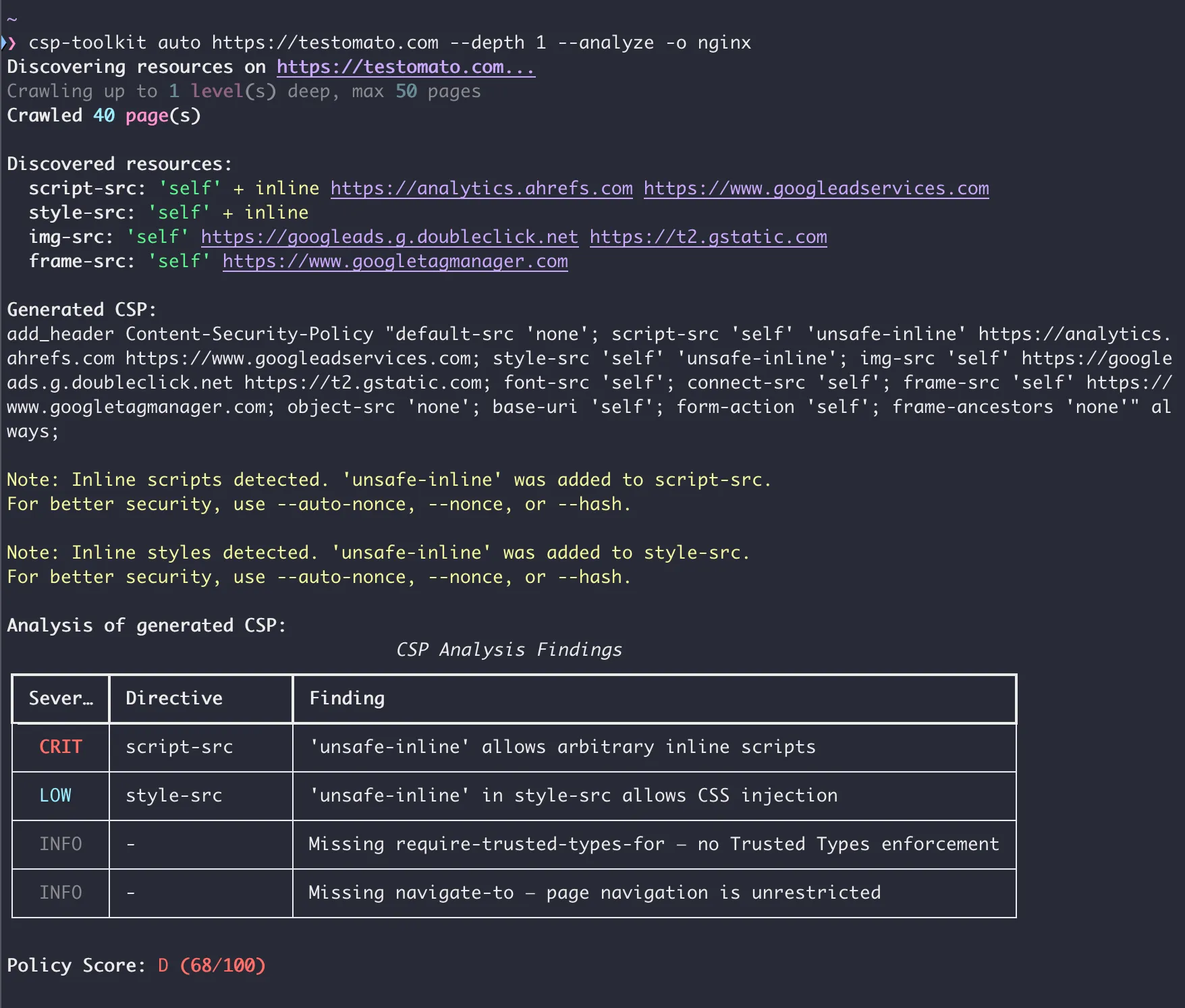
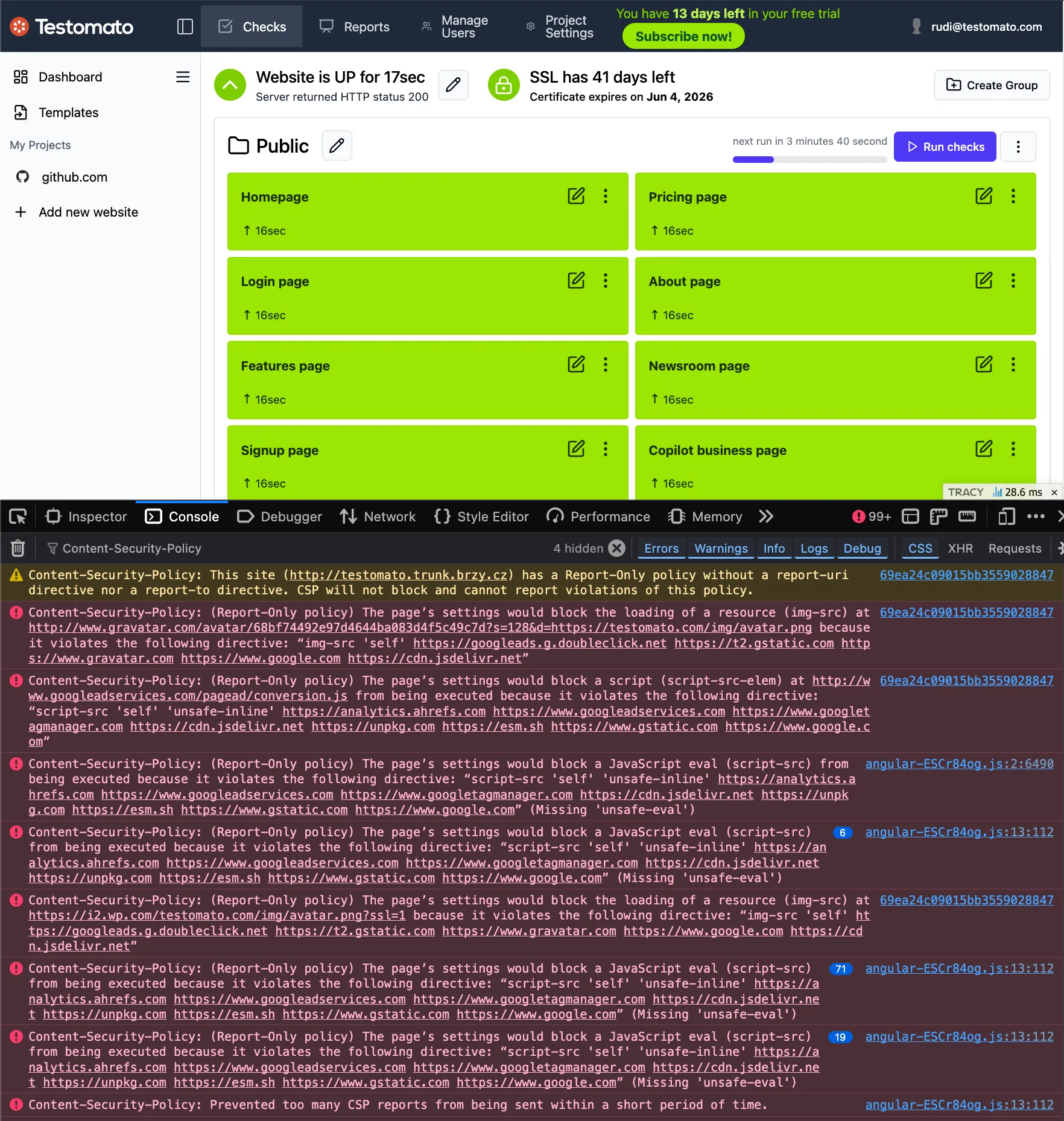
Once we’ve caught everything and moved to enforcement, we’ll set up the same CSP checks described above and continue monitoring our own header from the outside, like any other site we track.
Try it on your site
If your site already has a CSP, add a Content-Security-Policy presence check first. For a contains check, you can use the “Fill current value from the website” button and Testomato will scrape the site and fill the value field for the check with the content of your policy. That one check confirms the header doesn’t disappear or change after a deployment without you knowing. From there, layer in directive-level checks as your policy matures.
If you want a broader second opinion, HTTP Observatory will show you where your security headers stand today. We cover the most important security headers and how to monitor them in our HTTP response headers guide.
If you just want a quick look at the exact, current value of your Content-Security-Policy-Report-Only header — without setting up a check first — Testomato’s HTTP Response Inspector returns the full response headers for any URL.
Resources and tools
- CSP Evaluator (Google) — audit your policy for known weaknesses and bypass vectors; npm package also available
- Report URI — violation reporting; the CSP Wizard uses real traffic to help build your policy. The workflow: deploy report-only → collect violations via Report URI → refine with the Wizard → enforce → monitor the header with Testomato
- OWASP CSP Cheat Sheet — practical examples, sample policies, common gotchas
- Astro CSP — For all you static site builders and monitors, native CSP support (via meta tag) was introduced as experimental in Astro 5.9 and became stable in Astro 6.0; see the configuration reference. (As of this writing, astro.build has no CSP header.)
Start monitoring your site with Testomato
14-day free trial. No credit card required.

Written by
Rudi Kraeher