Schema Markup Validation Is Not Enough: Monitoring JSON-LD
In November 2023, the SEO manager of five live music venues updated The Events Calendar — a widely used WordPress event management plugin — and silently lost more than 100 event rich results across all five sites. The markup was valid and from the manager’s perspective the sites looked fine in the browser. What neither the site manager nor the validator could see was that logged-out visitors — Googlebot included — were being served pages with no event schema at all.
The first sign came from Search Console, days later. By then, the weekend’s shows were already gone from Google’s event results. By their own estimate, a plugin update had cost tens of thousands of dollars across venues doing hundreds of thousands in weekend ticket sales.
Every guide on schema markup covers the same four steps — audit, choose types, implement, validate — and stops there. What happens to the markup after it goes live gets almost no coverage. This post is about what breaks after deployment and how monitoring catches it.
Structured data, schema markup, and JSON-LD
Structured data is machine-readable metadata embedded directly in a page’s HTML — descriptions that tell search engines not just that a page exists but what it contains: a product with a price or an event with a date. It’s often grouped with a page’s meta tags, but it’s a richer format with its own monitoring needs.
When that structured data uses the schema.org vocabulary, it becomes schema markup. Search engines use it to build rich results in SERPs, populate knowledge panels, and answer queries without a click.
| Term | Definition | Example |
|---|---|---|
| Structured data | Any machine-readable data describing entities and their relationships | A row in a database, an RDF triple, a JSON document |
| Schema markup | Structured data using a defined vocabulary — usually schema.org — to describe entities for search engines | A Product block describing a page’s main offer |
| JSON-LD | A serialization format for embedding structured data in HTML, using <script> tags | <script type="application/ld+json">{...}</script> |
Every entity in this model has a type (Person, Product, Event), a set of properties (name, price, startDate), and relationships to other entities — an Article links to its author; a page links to a BreadcrumbList.
JSON-LD is Google’s recommended format because it decouples the markup from the HTML around it. You can add or update it without touching templates, generate it through a CMS plugin or Google Tag Manager, and nest related entities cleanly.
The two older alternatives — Microdata and RDFa — attach attributes directly to HTML elements, which works but gets unwieldy outside tightly controlled templates.
JSON-LD types that appear in search results
When it comes to JSON-LD for SEO, a handful of types covers most of what actually shows up in search results.
| Type | What it enables in search |
|---|---|
Organization / LocalBusiness | Knowledge panel: name, logo, contact info, social profiles |
Product / ProductGroup | Product snippets and shopping knowledge panels showing price, availability, and ratings |
Event | Event rich results with date, location, and ticket info |
BreadcrumbList | The breadcrumb trail rendered above the SERP snippet |
AggregateRating | Star ratings and review snippets alongside listings |
Article / BlogPosting / NewsArticle | Date and headline information shown in search results via datePublished and dateModified |
FAQPage | FAQ rich results — deprecated May 2026, no longer shown in search |
Each type also has required and recommended properties. Many errors originate here: a required property is missing, the value doesn’t match what’s visible on the page, or the type doesn’t fit the content. Validators solve for any syntactical issues during initial implementation, but mismatches in visible content or incorrect type usage can go through without any warnings or errors.
The schema markup lifecycle
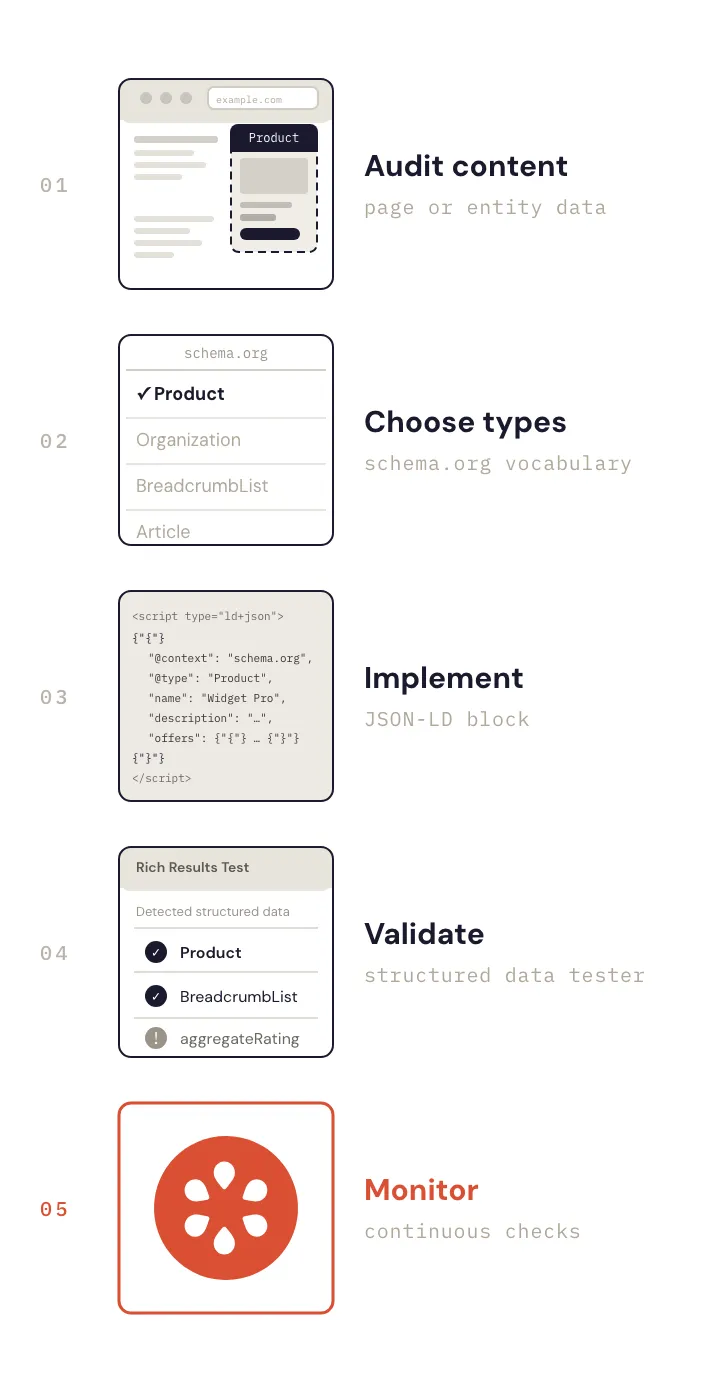
Schema markup work breaks into five stages:
- Audit content — figure out which pages have which entities worth marking up
- Choose types — match each entity to a schema.org type
- Implement — generate or hand-write the JSON-LD blocks
- Validate — confirm the markup is syntactically correct and schema.org-compliant
- Monitor — keep watching, because the markup that worked on Tuesday may not be there on Wednesday
Almost every schema guide treats stage 4 as the end. Stage 5 barely gets mentioned, and the tools available for stages 1–4 are part of why — there are solid options for each. Where it gets thin is the continuous side.
Schema markup tools
The main schema markup tools that most SEOs reach for each cover different aspects of the problem.
- Schema.org Validator — validates against the schema.org vocabulary, independent of Google’s eligibility rules. On-demand, no monitoring.
- Google’s Rich Results Test — one-off check on a URL or pasted markup; tells you whether it’s eligible for specific rich results. Syntactic and eligibility-focused only.
- Google Search Console — the only one that reflects what Google actually parsed from your pages, but the data is delayed and only updates when Googlebot recrawls.
- Crawlers (Screaming Frog, Sitebulb, Ahrefs, Semrush) — comprehensive coverage at audit time, useful for scheduled crawls, but not designed for continuous monitoring of individual pages.
None of the tools above can tell you whether the markup on your live page still says what it should, right now, unless you manually pass page URLs or individual JSON-LD blocks to the validators. As far as we can tell, no other monitoring tool offers automated, property-level JSON-LD checks on a schedule that notifies you when anything breaks.
How JSON-LD breaks after validation
Schema markup reaches a page through a pipeline — a CMS plugin, a template, a build step, a GTM container — and any change to that pipeline can alter or remove the output without triggering any error. None of the validation tools run continuously; they catch what’s wrong at the moment you test, not what breaks the next day.
Here are two documented, real-world examples of how things can break:
1. A plugin update wipes schema for anonymous visitors
A plugin update suppressed the JSON-LD for unauthenticated visitors only. The site manager, browsing while logged in, saw nothing wrong. Googlebot, which always crawls unauthenticated, saw pages with no event schema.
The signal eventually came from Search Console — but only after Google had recrawled enough pages to register the drop.
2. Dynamic content and schema disagree
WooCommerce has a long-standing core bug in variable products: the JSON-LD always emits the cheapest variation price, regardless of which variant the page is actually showing. The markup is valid but the price in the JSON-LD is wrong.
Google compares structured data prices against what’s visible on the page — when they don’t match, it disapproves the product listing, removing it from Shopping results.
Other failure modes worth watching
| Failure | Cause |
|---|---|
| JSON-LD blocks disappear entirely | Deploy or template change |
Plugin emits stale Organization values | Plugin caching or settings not synced after a rebrand |
| Schema doesn’t match visible page content | A/B testing serving different markup to Googlebot |
dateModified not updating | Plugin or build step not reading the content change date |
Testomato catches all of these. A check on the right property value, running every five minutes, alerts you before Google does.
Why GSC isn’t enough
Google Search Console is the most authoritative structured data signal most SEOs have access to, but it reflects crawl data, not the live state of the page. Google’s own documentation is explicit about the lag: “Validation can take two weeks or more, depending on crawl frequency.”
In practice, the window between a deploy that breaks schema and the damage becoming fully visible in Search Console can stretch to four to six weeks. GSC has also had extended reporting freezes of its own — one incident in late 2025 left performance data stuck for weeks.
Monitoring JSON-LD with Testomato
The JSON-LD checker came directly from a customer request — an SEO consultant who needed to know the moment structured data values changed on pages they managed. It monitors individual property values inside any JSON-LD block, checking every five minutes against the live page.
When a check fails, Testomato sends an alert through your configured alert channel: Email, Slack, PagerDuty, or any other supported integration you select.
Rule syntax
Testomato provides a fixed set of JSON-LD preset checks, each targeting a specific property path.

An unscoped path like JSON-LD: name matches that property in any block on the page.
A type-scoped check like JSON-LD: Organization: name narrows the match to blocks where @type is Organization.
Type scoping matters on pages that carry multiple blocks. Testomato’s homepage, for example, carries both a WebSite and an Organization block — each with its own name property:
{
  "@context": "https://schema.org",
  "@type": "WebSite",
  "name": "Testomato",
  "url": "https://testomato.com/"
}
// ...
{
  "@context": "https://schema.org",
  "@type": "Organization",
  "name": "Testomato s.r.o.",
  "url": "https://testomato.com/"
}The full rule syntax, all operators, and failure modes are in the help doc. Presets cover the most common schema fields and type+property combinations.
What to monitor first
A practical starting set:
- JSON-LD: Product: name and JSON-LD: Product: offers.price on ecommerce pages — exactly the surface that breaks in the WooCommerce scenario
- JSON-LD: Organization: name on pages with an
Organizationblock — catches CMS updates and rebrands before they cause damage - JSON-LD: BreadcrumbList: itemListElement — catches template regressions that wipe breadcrumbs from SERPs
- JSON-LD: AR.ratingValue — Aggregate Rating is best monitored with the
matches patternregex operator, since the value changes over time but should always look like a number
Testomato also keeps a full incident history — each failure logged with its exact message, timing, and response details, up to 30 days back. If a rich result drops after a deploy, you can see exactly when the JSON-LD check started failing and what it found.
Microdata: the other schema.org syntax
JSON-LD isn’t the only way schema.org data reaches a page. Microdata — the older syntax mentioned earlier — carries the same vocabulary in HTML attributes, and some stacks still emit it as <meta itemprop> tags in the document head:
<meta itemprop="name" content="Testomato">
<meta itemprop="author" content="Rudi Kraeher">
Testomato has dedicated checks for these — Itemprop meta: name (and equivalents for author, description, and image) — each reading the content of the matching <meta itemprop> tag.
Schema markup isn’t visible in the rendered page, so you’ll never know there is a problem unless you are manually checking and see that the rich results have disappeared or after the Search Console report arrives. An effective implementation of JSON-LD begins with the validator passing, but everything after that – the next site deployment, plugin update, or CMS migration – needs ongoing monitoring.
Start monitoring your JSON-LD with Testomato
14-day free trial. No credit card required.
Found a bug or want to request a JSON-LD check we don’t cover yet? We track issues on GitHub or drop us a message.

Written by
Rudi Kraeher