Guide to Redirect Monitoring
In our analysis of 1,000 redirect monitoring checks across more than 300 different projects, we found that nearly a third of the tests verify the HTTP status code without also checking the final destination. If you only check the code, you confirm that there is a redirect, but you won’t know if it sends the user where they should go — or how long it takes to get there.
In our sample, most of the status code checks for redirects are asserting 301 Moved Permanently, meaning they are monitoring
permanent redirects. This makes sense, since
permanent redirects are the most important to get right. They are where link equity is at stake.
A 301 that points somewhere wrong still passes that equity; it just passes it to the wrong page, and the
status code alone will never show it.
Regardless of the reason for using a redirect, one-off manual checks during initial implementations only protect your SEO at the moment of deployment. Website migrations and content changes can cause redirect problems that are hard to detect efficiently without an automated solution for checking against future regressions, especially at scale.
This guide covers why continuous monitoring is an essential layer for resilient SEO redirect management. We’ll discuss the major use cases, grounded in real, existing project data, what to watch, and how to set up monitoring checks for your redirects.
What is a URL redirect?
A URL redirect points a request for one address at a different one. The client asks for the old URL, and instead of getting the content back, it is told where that content now lives and fetches it from there. One page can be reachable at several addresses this way, but only one of them serves the content. Redirects come up whenever content is renamed, reorganized, consolidated, or removed. Some possible scenarios include:
- A page moves — a post or product gets a new URL after a restructure of the site.
- A domain changes — a rebrand, an acquisition, or a set of country domains collapses into one global site.
- Pages merge — duplicate or thin pages are consolidated into one stronger page.
Besides keeping your content organized and navigable for users, redirects preserve and pass on the link equity you’ve built on the affected pages. Link equity is the ranking value a link carries from one page to another: a page that has earned links from other sites accumulates authority, and a redirect passes that accumulated value on to the page it points to.
Before we go deep on monitoring cases, let’s take a closer look at the different kinds of redirects.
Server-side redirects
Ideally, you implement your redirects on the server via HTTP. When done this way, the server should send a 3xx HTTP status code along with a Location header containing the redirect URL — the place where the client should go instead. Redirects are either permanent or temporary, and that distinction determines whether link equity passes to the new location.
The URL in the Location header is often the final destination, but in large-scale projects it isn’t unusual for that URL to redirect again. This
situation — redirects that lead to other redirects — is called a redirect chain, a suboptimal but common scenario that we discuss
more below.
There are four server-side redirect codes, and two questions separate them: does link equity move to the new URL, and can the client change the request method on the way there?
| Status code | Type | Link equity | Request method |
|---|---|---|---|
301 Moved Permanently | Permanent | Passes to the new URL | May be changed to GET |
308 Permanent Redirect | Permanent | Passes to the new URL | Preserved |
302 Found | Temporary | Stays on the original URL | May be changed to GET |
307 Temporary Redirect | Temporary | Stays on the original URL | Preserved |
Permanent redirects
Permanent redirects tell the client that the requested resource has been permanently moved to the URL in the Location header. For search purposes,
any link equity that has accumulated on the original URL should be passed to the new one.
Eventually, search engines like Google will stop showing the old URL to users and will return the new permanent location. But the permanent redirect is still useful even after the old URL has been de-indexed, because any backlinking sites, user-generated content, or bookmarks that still use the old URL will be redirected instead of hitting a 404.
301 vs. 308
The HTTP status codes for permanent redirects are 301 Moved Permanently and 308 Permanent Redirect. 301 is by far the most commonly used redirect
code. 308 is useful when you need to guarantee that the client does not change the request method and body —
to prevent wiping a form sent with POST or PUT, for example.
When a client receives a 301 in response to a POST request, on the other hand, the Fetch Standard permits the client to
change the request method to GET when making the redirect request to the URL in the Location header.
Real-world cases for a permanent redirect:
- Site migration to a new domain —
oldbrand.com/pricing/sent tonewbrand.com/pricing/after a rebrand or acquisition. - URL structure change — a CMS migration turning
/2019/06/post-name/into/blog/post-name/. - Canonical enforcement —
http://www.example.com/sent tohttps://example.com/, enforcing one protocol and host for good. - Merged or retired content — a discontinued product page sent to its replacement or a relevant category page.
Temporary redirects
Temporary redirects tell the client that the requested resource has been — you guessed it — temporarily moved to another location. With such redirects, link equity is not passed to the new location.
If a resource location remains temporary for too long, search engines may begin to treat it as a permanent redirect, so it is important to not lose track of temporary redirects and either remove them or convert them into permanent ones.
302 vs. 307
The HTTP status codes for temporary redirects are 302 Found (notoriously undescriptive) and 307 Temporary Redirect. The same distinction we
looked at above for the permanent redirects applies here as well: 302 allows the request method and body to be altered, while 307 does not.
These redirects are less commonly monitored than permanent redirects — in our sample, only about 1 in 13 status code checks assert a 302 — possibly because they are deployed less often and because incorrect permanent redirects are more costly for SEO.
Real-world cases for a temporary redirect:
- Maintenance windows — visitors sent to a status page while the original URL is briefly unavailable.
- A/B tests — a share of traffic sent to a variant URL while the original stays the indexed version.
- Short-lived campaigns — a stable promo URL pointed at whichever seasonal landing page is current.
Client-side redirects
When you don’t control the server and can’t redirect over HTTP, the redirect has to be declared in the page itself. There are three ways to do that, but each of the following approaches should only be used when server-side redirects are not possible.
HTML meta refresh redirects
A meta refresh redirect lives in the document <head> instead of the server response, as a meta element with http-equiv="refresh":
<meta http-equiv="refresh" content="0; url=https://example.com/new-page/">The number value for the content attribute is the delay in seconds, and that number decides how the redirect is read. Google
interprets an instant meta refresh — a delay of
zero — as a permanent redirect, and a delayed one as a temporary redirect. A zero-second meta refresh passes link equity the way a 301 does,
while a delayed one behaves like a 302 and keeps it on the original URL.
Accessibility caveat
The use of a delay in the meta refresh will cause your content to fail WCAG success criteria, because it is considered an “unexpected change of context that may interrupt the user.”
Instant meta refreshes without any delay (content="0; ...) are acceptable, but ultimately
WCAG recommends using server-side redirect methods whenever possible.
JavaScript location redirects
You can also redirect by assigning to window.location in a script block, which sends the browser to the new URL once the script runs. Google’s
guidance is to treat this as a fallback:
“Only use JavaScript redirects if you can’t do server-side or meta refresh redirects.”
The reason is that the redirect only exists if the script runs. Googlebot attempts to render every URL it crawls, but rendering can fail for many reasons, and when it does the redirect is never seen. Users who block scripts don’t get the redirect either.
Crypto redirects
If none of the other options are available to you but you still need to make sure users and search engines know that your content has been relocated, you can simply create a page or banner that links to the correct location.
Google’s position is that this is a last resort only. Nothing here is automatic — the visitor has to notice the link and click it, and search engines treat it as an ordinary link rather than a move.
Order of preference
Google lists redirect types in order of how reliably it can interpret them, and that order is a good default for deciding how to implement any redirect you control:
- Server-side 3xx — the only method where the move is stated in the response itself, and the one Google is most likely to interpret correctly.
- Instant meta refresh — read as permanent, passes link equity, but requires the page to load first.
- Delayed meta refresh — read as temporary, so equity stays behind, and it fails WCAG.
- JavaScript — depends on rendering succeeding, for both crawlers and users.
- Crypto redirect — not a redirect at all; a link the visitor has to act on.
What redirects to monitor
Not all redirects need to be monitored. What follows is sorted by the job a redirect does — canonicalization and migration — rather than by status code or method of redirection. Both redirect jobs are permanent redirect work, which is why nearly every check in our sample asserts a 301.
Canonicalization
In our sample, enforcing canonicalization is by far the most common reason people monitor redirects. A canonical URL is the one Google picks as most representative when several URLs serve the same content, and redirects are one of the signals it weighs when picking. Google makes that choice with or without your input. A redirect is the strongest way to influence it, because the non-canonical URL stops serving the content at all.
Across our sample, the monitoring setup involves a small matrix of checks per site, covering the typical ways that a visitor may arrive at the “wrong” point of entry:
- Protocol — http upgraded to https
- Host — www vs. non-www
- Path — trailing slashes
In each case the redirect implementation should point every variant at one canonical target, and the monitoring checks verify that it still does.
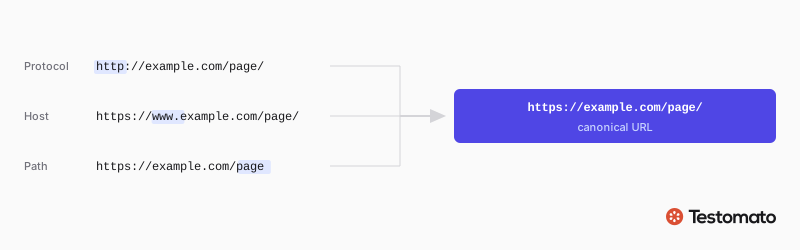 Protocol, host, and path each give a visitor a way in. All three should land on the same URL.
When watching canonical identity, your monitoring system should check both the HTTP status code and the location. This is the baseline monitoring setup to cover.
Redirect HTTP to HTTPS
You should ensure that the right protocol is used to access your site, which can be done via redirect (some hosting providers can automatically redirect HTTP traffic to HTTPS).
An HTTPS redirect is only useful if the SSL certificate on the destination is valid. When one expires, the redirect keeps working and the browser warns the visitor instead of showing the page.
With Testomato, SSL monitoring is enabled by default on every project, and you choose how far in advance you want to be notified about upcoming certificate expiry.
www vs non-www
Pick one canonical host and 301 the other to it. If both hosts serve the page instead of one redirecting to the other, search engines see two URLs with the same content and split its ranking signals between them.
Trailing slash
Use monitoring to ensure the correct canonical variant is served (/path → /path/).
When both path forms serve the page, you get the same split for ranking and search engines burn
crawl budget on the duplicate.
Since redirect rules can be defined at multiple layers — on the server, CMS, frontend build, CDN/proxy, plugins — conflicts in the rules can also create redirect chains and loops. Don’t sleep on this one!
Canonical pages DO NOT redirect
After covering the full protocol/host/path matrix of canonical redirects, the last case is the inverse: that the canonical URL does NOT redirect.
Use an HTTP Status Code check for 200, with the “Follow HTTP redirects” option disabled so that the check asserts the status of the URL itself. See how to set up redirect checks.
Website migrations
Another major use case in our sample is monitoring website migrations, where several dozen checks point at a different domain entirely. Our analysis uncovered three core patterns:
- Portfolio consolidation — several retired brands folded into one survivor
- Rebrand / acquisition — a company’s old domain replaced by a new domain
- Country code consolidation — multiple per-country domains (
.de/.cz/…) collapsed into one.comwith locale paths
After a website migration, redirects carry all the accumulated link equity from the retired domains. Use monitoring to ensure that a retired domain’s equity continues to flow to its successor, at the right location.
Google’s own site move guidance is to build a URL mapping from each old URL to its corresponding new one, and to monitor both the old and new URLs afterwards. Pair an HTTP Status Code check for 301 with an HTTP Redirect Location check set to the matching page on the new domain.
Common redirect problems
Each of the scenarios we looked at above represents real business usage. But there are some additional failure modes to be aware of at both the implementation stage and in your monitoring setup after redirect deployment.
Broken redirects
Redirects that lead to 404, wrong URLs, or just an empty page are quite common, especially for large sites that have been around for a while and undergone a lot of content changes.
Simple status checks are not sufficient to avoid broken redirects, because they may return 200 even though there is no content there (a case that is sometimes referred to as a soft 404).
You can prevent this problem by asserting both the destination and the code, and if the page content is important, add a Page Content (Text) check for the heading text, too — see our content monitoring guide for more.
Redirect chains
Another common problem with redirects is having long chains, where one redirect leads to another redirect, which leads to another, and so on. Even though Googlebot will follow a chain for up to 10 redirects, it is in everyone’s best interest to have the redirect chain be as short as possible.
Long chains waste crawl budget. Moreover, the longer the chain, the longer it takes for the user to reach their intended destination. With very long chains, the delay may become noticeable to the user, which degrades their experience and worsens your response time, which is a ranking signal.
If a redirect chain exceeds a crawler’s limit — for other bots it may be lower than Googlebot’s 10 hops — then the crawling stops before reaching the destination page and the link equity will not end up where it needs to go either.
Monitoring correct status code and canonical locations helps you identify chains so you can keep them short or even remove them entirely. Ideally, every redirect should have only one canonical destination URL, without any chaining at all.
Redirect loops
A related problem you can prevent with good monitoring checks is redirect loops. A redirect loop is a chain that returns to a URL it has already visited, so the client is sent in a circle until it hits its redirect limit and aborts.
chain:  /old/ → /detour-a/ → /detour-b/ → /final/
loop:   /a/ → /b/ → /a/ → /b/ → ...
A loop causes the same kind of problems that a long chain does — loss of link equity and wasted crawl budget — but because a loop is circular, unlike a chain it will inevitably hit the crawler limit.
One of the most common ways to create loops is to have conflicting rules, which is why it’s best to consolidate where you define your redirect rules (only via HTTP, or only in your frontend framework config, etc.). If one layer redirects to one page and the other redirects back, then you’ve created an unusable experience.
In practice, an error indicating too many HTTP redirects — ERR_TOO_MANY_REDIRECTS in Chrome — means you likely have a redirect loop to fix.
How to fix redirect chains and loops
Find the redirect rules that point back to each other. If your rules are set on multiple layers in your stack, you’ll want to consolidate all the redirects for easier analysis.
Then keep chains as short as possible, ensuring that each redirect goes straight to the final destination without any detours along the way.
This is where monitoring can be useful — asserting the redirect code and location in monitoring checks creates a single source of truth for validating all your redirects and preventing accidental loop and chain deployments.
Monitoring with Testomato
The final section of this article shows you how to set up checks for monitoring redirects with Testomato, but the information presented here is generally useful, no matter what monitoring tool you use.
Testomatobot follows redirects by default
Our crawler, Testomatobot, is designed to mimic the default behavior of Googlebot and other search engine crawlers. That means that it follows redirects to their final destination, returning the HTTP status code (most likely 200) and page content for that location.
This can be confusing if you are checking a URL that you expect to 301, but the crawler is designed this way intentionally so that your checks reflect how real end users and search engines actually interact with your site. Browsers and bots follow redirects, so Testomato does too.
If you want to test your 301s explicitly, you can set up a simple check for that, shown below.
How to set up redirect checks
As we discussed earlier, in the section on canonicalization, a complete redirect monitoring check tests both the code, via the HTTP Status Code check, and the location, using the HTTP Redirect Location check.
To stop the crawler from following the redirect first, open the check’s Advanced options and switch off “Follow HTTP redirects”.
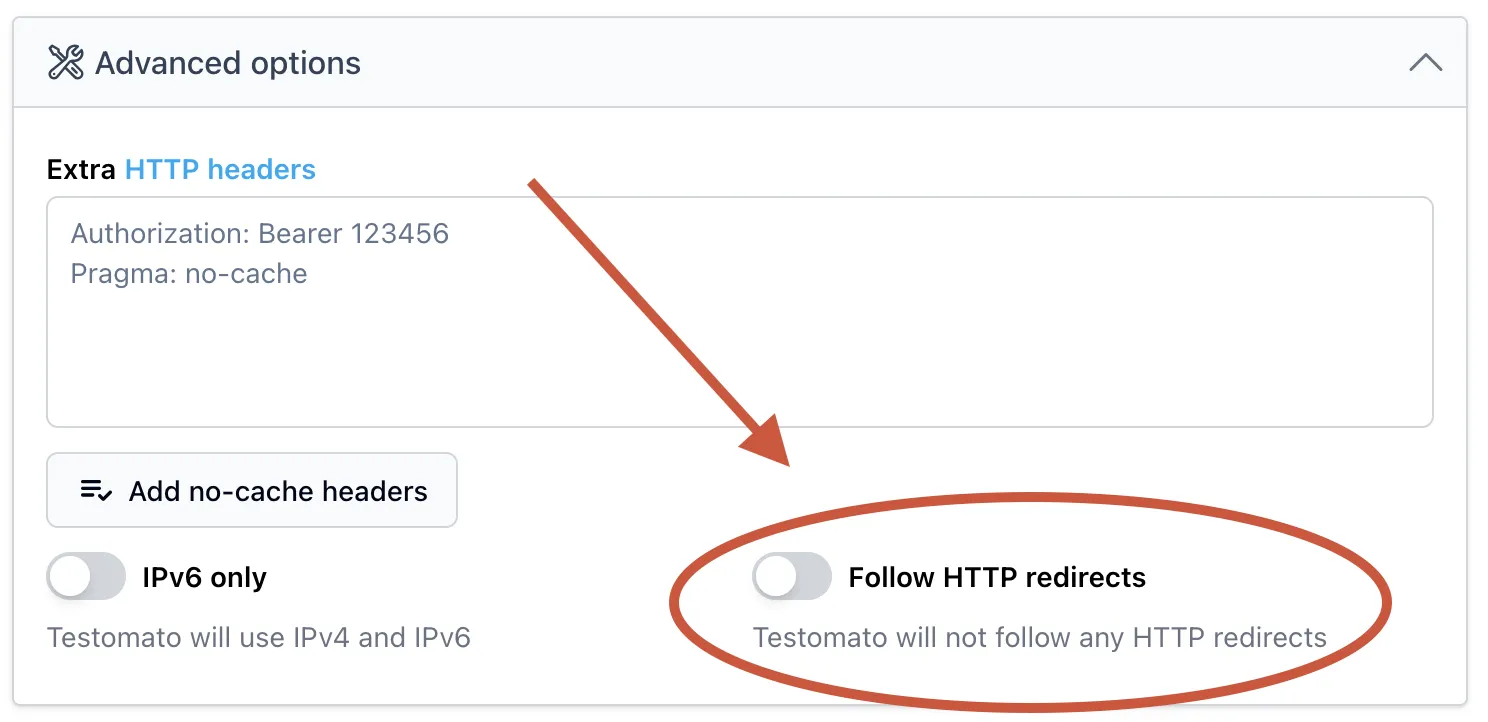
The full walkthrough is in our help documentation, but the short version is:
- Add a check for the URL that should redirect.
- Switch off “Follow HTTP redirects” in Advanced options.
- Add an HTTP Status Code rule for the code you expect, such as 301.
- Add an HTTP Redirect Location rule with the destination URL.
You don’t have to type that destination in yourself. When you add a rule, Testomato reads the current value from the live URL and fills it in for you, so what you assert is what the server is sending right now.
Monitoring many similar URLs
The HTTP Redirect Location check matches the destination exactly by default. Switch the operator to matches pattern and you can assert a regular expression instead — useful when the destination varies from one URL to the next, as it does with filtered, paginated, or dynamically generated pages.
Common setup mistakes
There are three technical issues to know about when you are setting up your redirect monitoring with Testomato.
Relative vs absolute URLs
The HTTP Redirect Location check compares the Location value as a string, exactly as the server
sends it.
Assert https://www.python.org/doc/ when the server answers location: /doc/ and the check fails on a
redirect that is working fine. Instead, assert the same raw value the server returns
— which is what Testomato fills in for you.
Status code vs Location value
Don’t use a status code as the expected value of the HTTP Redirect Location check. This seems obvious, but our analysis revealed that some checks are misconfigured in this way.
The check tests the redirect location URL as a string, and a status code number is never a valid location for it.
An empty Location value can never pass
The HTTP Redirect Location check is also the wrong tool for asserting that a URL does not redirect. When there is no Location at
all, the check fails before it compares anything, so leaving the expected value empty produces a check that can never pass.
To assert that a URL doesn’t redirect, use the HTTP Status Code check, as covered for canonical pages.
What to monitor first
You don’t need a check on every redirect. Start with the canonical matrix — protocol, host, and path for your main entry points. Every site has those, they are the most common thing our sample monitors, and they are the ones a deploy is most likely to break.
Migration redirects come next. They carry more accumulated link equity than anything else you run, and nobody on your team visits the retired domain day to day, so a break there stays invisible until rankings move.
Prioritize permanent redirects over temporary ones. A broken 302 is usually a short-lived problem; a broken 301 leaks the equity built up on the old URL for as long as it goes unnoticed.

Written by
Rudi Kraeher