Guide to Website Content Monitoring
According to the HTTP Archive’s 2025 Web Almanac, more than 90% of web pages depend on third-party resources — scripts and widgets that aren’t part of your own code.
Their report includes “Consent providers” as one of the categories of third-parties, in the form of scripts that allow sites to manage their user consent, especially as cookie consent banners and popups.
Those cookie consent scripts run on the page but aren’t yours. If the script fails to load or ships with a broken config, your server doesn’t know anything went wrong —
it still returns a normal 200 OK while the page stops showing a consent banner, leaving your site GDPR non-compliant.
That’s what website content monitoring checks for.
What is website content monitoring?
Website content monitoring is the automatic, ongoing check that the text and markup on your live pages match what you expect — catching content changes or removal before a visitor does.
In practice, that means checking that a specific page still shows a specific price, headline, link, or form.
Website content monitoring borders on a few related fields, which makes it easy to confuse. Let’s clear up the difference before going further.
What it is NOT
- Content change monitoring - watches any page for edits and alerts on any change, without judging whether the change is correct — tools like Visualping.
- Website QA and testing - checks a site before it ships, usually pre-release in a staging environment — tools like Selenium or Cypress — instead of continuously on the live site.
- Compliance tooling - scans for regulatory requirements like cookie consent or accessibility standards — tools like OneTrust — rather than your own content’s correctness.
It’s also not marketing analytics (Google Analytics, Hotjar), content creation automation (Jasper), or crawling/scraping (Screaming Frog).
With that distinction clear, the next question is why do it.
Why should you monitor your website content?
There are two main things that monitoring your website content can do for you that uptime monitoring alone cannot.
Content presence: confirming that any content is there at all. It is possible for the server to be up and successfully returning a 200 HTTP status code without any content available to the user.
Content correctness: confirming that the right texts, links, etc. are present on the correct pages.
If you have missing or incorrect content, the negative repercussions vary widely and depend on the nature of the content and page that is impacted.
The most serious problems come from wrong information on pages built for financial transactions or ones that contain critical information (privacy, security, legal, health, etc.). But missing or incorrect information on any page can be confusing to users, causing them to leave or lose trust.
With a large site with many pages, it is impractical to manually keep tabs on every page, which is why automatic solutions for monitoring the content are useful. Let’s have a look at some more specific issues that can crop up.
What can go wrong?
A CMS update wipes a pricing block
A price can be shown as a small piece of markup, like a <span> with a price class. If a content update or a plugin change removes that value, the page still returns a normal 200 OK response.
A template change removes a form
A contact, signup, or quote-request form can be embedded through a shared template or component. A change to that template — a redesign, a framework upgrade, or a merge that drops a component reference — can accidentally remove the form from a page while the surrounding content stays intact, cutting off a conversion path.
A third-party script serves the wrong component variant
A cookie-consent banner can come from a third-party consent-management script that detects a visitor’s region and serves a different variant of the banner accordingly — a full opt-in flow for GDPR-covered visitors, a simpler notice elsewhere. If that detection misfires, a visitor can get the wrong variant for their region while the server still returns a normal 200 OK.
How do you monitor your website content correctness?
You monitor website content correctness by using an automatic monitoring tool to request key pages and check the page content and markup against your assertions (i.e., what you expect to be there vs. what is actually there when the monitoring bot crawls the page).
You use the monitoring tool to assert what you expect to be present on the page — a specific keyword, phrase, or maybe something broader like a text pattern (for example you expect certain currency symbols to be present on the pricing page).
When you monitor your content with Testomato, every check is composed from a type, an operator, and the value you expect.
Check type
Testomato has two main check types for monitoring website content.
Page Content (Text) reads the rendered text on the page, with markup stripped out.
HTML Source Code reads the raw HTML your server sent back, tags and all.
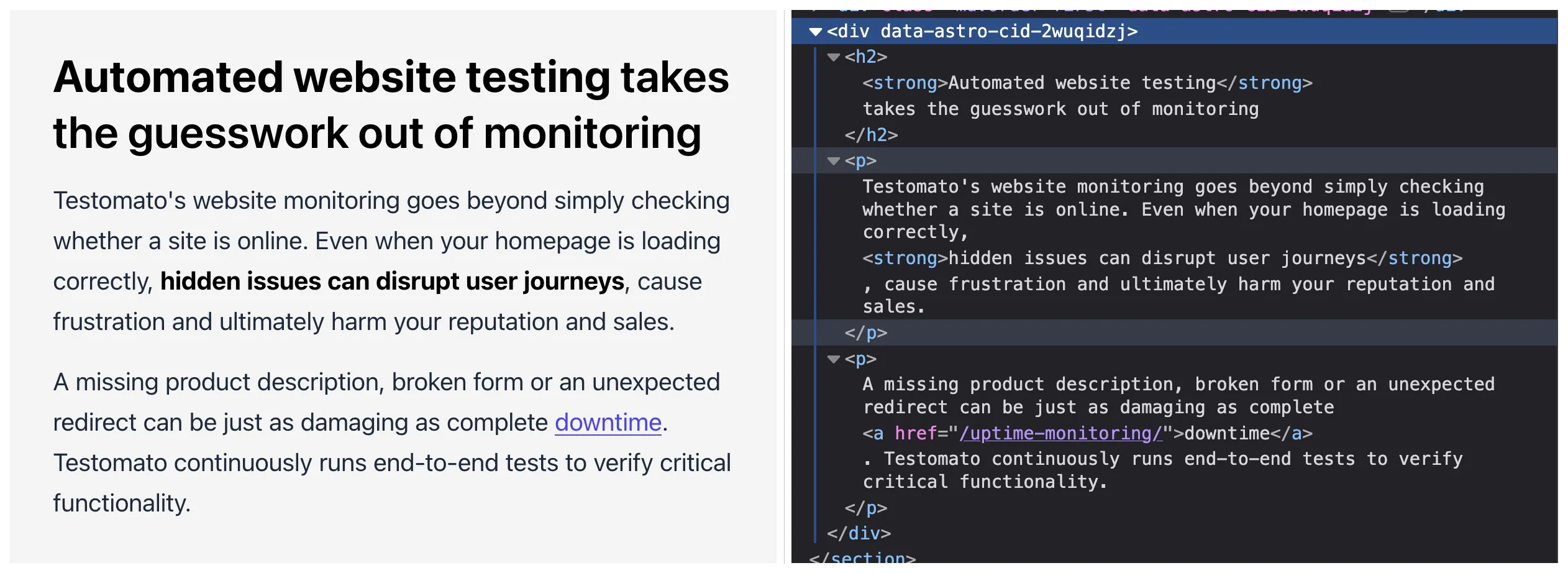
Page Content sees only the rendered text. HTML Source Code sees the tags too.
Many critical aspects of your site can be monitored using these two check types, but Testomato also includes some purpose-built checks for common tags, such as canonical link, Open Graph, title, and meta description.
Check operators
An operator is the comparison rule between what you expect and what the check actually finds on the page — for example, that the page contains a phrase, or that an XPath expression matches at least one element.
For the two core content monitoring checks — Page Content (Text) and HTML Source Code — Testomato groups its operators into three buckets:
- Text comparison —
contains,does not contain,is exactly - Pattern matching —
matches pattern,does not match - XPath —
matches XPath
When you set up your monitoring, default to using text comparison first and in most cases. Use Pattern matching or XPath only when a plain match can’t do the job.
Text comparison
Text comparison checks whether the page’s content contains, doesn’t contain, or exactly equals a specific string.
A plain contains check is the most common — for example, verifying your pricing page still shows the correct price, or that a product page still displays “In stock”
or has the appropriate copy when an item is out of stock.
The is exactly operator is used far less, mostly for comparing an entire file, like robots.txt, against a known-good version.
Both operators are case-sensitive; check the full details on how they work in the string checks help doc.
Pattern matching
Pattern matching checks whether the page’s content matches or doesn’t match a regular expression.
Regex operators (matches pattern / does not match) are reserved for values that vary predictably (search-result counts, prices, IDs) —
for example, matching any four-digit order number, a footer copyright year, or an incrementing version string instead of one specific value.
XPath
XPath checks whether an XPath expression matches at least one element in the page’s HTML.
XPath is a query language for selecting elements in an HTML document by their structure — a tag, an attribute, a position, or a count — rather than by their text.
It’s the minority tool here, reserved for count/position/compound-condition needs — for example, asserting every <img> has a non-empty alt attribute:
count(//img[not(@alt) or @alt=''])=0More syntax and use case examples are in the XPath checks help doc.
Using the right checks
As the name of the check — Page Content (Text) — suggests, the most common use of that check is to verify page text content. These text content checks are frequently watching price/currency, stock/availability, error/not-found text, search-result counts, and UI labels.
For many sites, content checks on those important keywords, phrases, and pages are more than enough. But what about the HTML Source Code check? What kind of content does it help you to monitor?
HTML Source Code checks
For anything that you need more than just literal text, HTML Source Code gives you more power to verify markup attributes and metadata that need to contain certain values or patterns. Some examples of what you can do with this check type include:
- Verifying a specific internal link still exists with its exact href — nav-menu items and language-switcher links.
- Verifying tracking/analytics attributes survived — data-gtm-cta, and similar.
- Verifying a specific UI component or feature is rendering — a cookie-notice or form field.
Using this check type for Text comparison and Pattern matching covers many common use cases, but if you have to verify something slightly more complex, you can also create custom checks that match XPath expressions.
For example, you may have combined conditions on certain HTML elements (e.g., og:type='website' AND content='...')
or specific count assertions (count(//h1)=1, i.e., asserting that a page contains only one h1 tag).
Asserting a complex condition or an element count like this is something you need to use XPath for.
Dedicated checks
Often there are multiple ways to achieve your monitoring goal. Especially with the HTML Source Code check, it is possible to verify your page content, markup structure, and metadata but a lot of the important HTML elements also have dedicated checks that can be easier to set up and duplicate across projects.
Testomato supports dedicated checks for many important meta tags, including canonical link, meta description, robots meta and link, Open Graph and Twitter Card, Meta Article, Meta Itemprop, and JSON-LD. For any of those elements, when you are only checking a single value, there is a dedicated check available, so custom HTML Source Code checks are not necessary.
When in doubt, or if you cannot find a dedicated check for the element that you want to monitor, the HTML Source Code check is there as a powerful, all-purpose tool.
Some elements — hreflang, robots.txt, sitemap — have no dedicated check at all, complex conditions or not. For those, the general HTML Source Code check is the only option.
How to verify your website content with Testomato
1. Page Content, contains
A plain contains check on Page Content (Text) is the simplest to set up. Testomato’s own pricing page shows the Starter plan at $21 /month, so a check for that string on the pricing page catches the case where a pricing update or a currency migration changes the number a visitor sees.

2. HTML Source Code, contains
Not every assertion is about visible text. The header navigation links to /website-monitoring/ through an anchor’s href attribute —
something a Page Content (Text) check can’t see, since it strips tags before comparing.
The same contains operator on the HTML Source Code check instead lets you assert directly on the markup,
confirming the link itself wasn’t dropped or changed, independent of whatever text sits inside it.

3. Page Content, matches pattern
The footer copyright line is a case where a literal contains check would work today and break in a few months — the year in ”© 2026 Testomato s.r.o.” changes every January. Pattern matching lets the check tolerate that predictable variation. A regex for four digits after the copyright symbol keeps passing when the year changes, instead of needing a yearly update.

4. HTML Source Code, matches XPath
Some assertions aren’t really about a specific string at all — they’re about the shape of the page. Checking that a page has exactly one <h1> isn’t something contains or matches pattern can express, since neither operator can count elements. That’s what XPath is for. count(//h1)=1 on the HTML Source Code check asserts the page’s heading structure directly, catching a template regression that duplicates or removes the main heading.

Website content monitoring works the same way as any other assertion-based testing: define what should be there, check it automatically, and get alerted the moment it’s missing.
Start with Page Content (Text) and a plain contains check on whatever a visitor would notice first — a price, a headline, an in-stock label. Use HTML Source Code, pattern matching, or XPath only once you hit something a literal string match can’t express, and check whether Testomato already has a dedicated check for it before building your own.
Start monitoring your website content
Catch missing or incorrect content before your visitors do.

Written by
Rudi Kraeher