Guide to HTTP Response Header Monitoring
Of over 1,300 real response header monitoring rules we analyzed, the most prominent rule we found asserts the absence of one word: noindex.
That one rule tells Google to drop the page from search results, without any visible change to the page itself.
Among the many header checks that our users are running, the biggest missed opportunity we found is monitoring security headers. Almost no one checks them.
This article covers the header checks teams already rely on as well as the ones worth adding, starting with the basics of HTTP headers.
What are HTTP headers?
HTTP headers are name-value pairs that let the client and the server pass additional information with a request or a response. When a browser or a monitoring tool asks for a page, it sends headers along with the request, and the server answers with headers of its own before it sends the page content.
Each header sits on its own line. It starts with a case-insensitive name, followed by a colon and a value, for example Content-Type: text/html; charset=utf-8.
That specific header tells the client how to read the body. In this case, it says that the body is an HTML document and uses UTF-8 character encoding.
Here is part of the head testomato.com returns for its homepage:
HTTP/2 200
content-type: text/html; charset=utf-8
vary: Accept, Accept-Encoding
x-frame-options: SAMEORIGIN
x-content-type-options: nosniff
strict-transport-security: max-age=31540000
The first line is the status line, with the protocol version (HTTP/2) and the three-digit status code. After that come all of the response headers.
What is the purpose of HTTP headers?
Headers carry instructions and context for the body content. With headers, a server can tell clients and proxies what to cache and for how long, restrict pages to specific users, keep a session across requests with cookies, and allow a page to load resources from other domains.
Headers also make HTTP easy to extend. New functionality can be introduced when a client and a server agree on what a new header means, without any change to the protocol.
Request headers vs response headers
Request headers describe the client’s preferences and context. They tell the server what is being requested and who is asking, for example which browser sends the request, which formats it accepts, or which credentials it has.
Response headers carry the server’s decisions and instructions. They describe the response and the server that sent it, for example the format of the content, how it should be cached, or where a redirect points.
Here is how the headers look when you request testomato.com with curl.
Request headers are indicated with >, and response headers with <.
> GET / HTTP/2
> Host: testomato.com
> User-Agent: curl/8.7.1
> Accept: */*
>
< HTTP/2 200
< server: nginx/1.31.6
< content-type: text/html; charset=utf-8
< vary: Accept
A monitoring check works on both sides of this exchange. It sends a request, sometimes with custom headers you add yourself, and checks the response headers that come back.
What are the most commonly used HTTP headers?
MDN’s header reference groups headers by function, from authentication and caching to cookies, CORS, and security. For monitoring a website, the headers that matter most fall into a few use cases:
- Content type and encoding:
Content-Typetells the browser what the content is and which character set to decode it with. - Performance:
Cache-Control,Content-Encoding, andVarycontrol caching and compression. - Redirects:
Locationholds the destination of a redirect. - SEO:
X-Robots-TagandLinkcontrol how search engines index and canonicalize a page. - Security:
Content-Security-Policy,Strict-Transport-Security, andX-Frame-Optionsprotect visitors from attacks.
We cover each of these headers in detail in Important response headers.
How to check HTTP headers
The quickest way is our HTTP headers checker. Enter a URL, optionally add your own request headers, and it returns the status code, the response headers, and a preview of the body. The request is proxied through our servers, so it’s especially useful to check responses to requests made from outside your network and when setting up or debugging your monitoring checks.
To check headers via the command line, you can use curl. To see both the request headers curl sends and the response headers it gets back, run:
curl -v https://example.comTo print only the response headers, run:
curl -s -D - -o /dev/null https://example.comWhy monitor your HTTP response headers?
Headers can change for many reasons, for example after a server migration, a CMS or plugin update, a new CDN rule, or a deploy that ships the wrong settings to production.
Since they are not visible on the page, you need to be watching the headers themselves to see if they change. A monitoring check requests the page on a schedule, compares the response headers against what you expect, and alerts you when they stop matching.
Below are the core use cases we’ve extrapolated from our data — what real professionals look for in their HTTP response headers.
Content type and encoding
The Content-Type header tells the browser what format a page is in and how to decode its text. If the charset is missing or wrong,
the browser guesses, and umlauts can come out garbled. If the format is wrong, the browser can refuse the file.
Monitor Content-Type so you know when your pages stop being served in the format and encoding you expect.
Performance
Response headers control how your pages are compressed, which affects how fast they load. Whether a server compresses a response depends on its configuration, so a server can turn compression off without any change to the page content.
Monitor Content-Encoding so you know when your compression settings change.
Redirects
The Location response header holds the destination of a redirect. Checking the status code alone confirms that a redirect exists, but not where it goes.
Monitoring your redirect location headers can help you identify redirect loops or incorrect destinations.
While it is possible to check the Location header, Testomato has a dedicated HTTP Redirect Location check for this use case.
SEO
Several response headers tell search engines whether to index a page, which URL is the canonical, and which language version to show.
Indexing
Indexing is the step after crawling in which a search engine
analyzes a page’s content, picks a canonical version among duplicates, and decides whether to store it in its index, the database it serves search results from.
The X-Robots-Tag header can carry indexing rules such as noindex.
When Googlebot finds noindex, Google drops the page entirely from search results, regardless of whether other sites link to it.
The same index-blocking rule can also come from a robots meta tag in the HTML, which we cover in our meta tags guide.
A common way noindex reaches production is a configuration meant for a staging or preview site that isn’t meant to rank. Monitoring this header
ensures that you’ll be alerted immediately if the wrong indexing rule accidentally gets deployed to prod.
Canonicalization
Canonicalization is how a search engine picks one URL to represent a set of duplicate pages. Besides the canonical tag in the HTML, a canonical can also be declared in the Link response header.
If the canonical starts pointing to the wrong URL, for example a staging domain, the search engine
consolidates ranking signals onto the wrong target.
Read more about duplicate content and canonical links in our meta tags guide.
Localization
Localization with hreflang connects the language and regional versions of a page, so search engines can show
the most fitting URL for the searcher’s language. For non-HTML files, hreflang goes in the Link header.
SEO rules are the largest group of header rules in our data: more than five hundred rules in over a hundred projects,
and 98% of them assert that noindex or nofollow is absent.
You should monitor your SEO headers because a wrong value can block indexing without any change to the page itself.
Security
Security headers tell the browser how to protect your visitors from attacks such as cross-site scripting and clickjacking. Surprisingly, many sites haven’t added them at all.
According to the 2025 Web Almanac,
Content-Security-Policy (CSP) adoption is at 21.9%, and only 36% of mobile pages send the HTTP Strict-Transport-Security (HSTS) header, though adoption
is steadily increasing.
Consistent with HTTP Archive’s findings, our own data shows few active monitoring rules checking site security headers — if there are no headers sent, then there is nothing to check. But CSP and HSTS can be monitored like any other headers.
CSP has a suite of dedicated Testomato checks, covered in our CSP guide.
If you do have some security headers deployed, scanners like MDN’s HTTP Observatory assess your headers and report what to fix. Whether you are improving existing headers or starting from scratch, after you implement security headers make sure you are monitoring them.
Important response headers
This section covers the specific headers behind each use case above — what each one does and what warnings or errors to watch out for.
Content type and encoding headers
Content-Type
Content-Type gives the MIME type of the body and, for text, its charset. Without a charset, browsers fall back to a default encoding and non-ASCII characters can render as mojibake.
Content-Type: text/html; charset=utf-8Watch out for: a missing or different charset. Charset names are case-insensitive, so UTF-8 and utf-8 are considered the same value.
To fix garbled text, set the charset explicitly.
Performance headers
Cache-Control
Cache-Control tells browsers and shared caches whether to store a response and for how long. max-age sets the lifetime in seconds,
no-cache allows storing but requires revalidation before reuse,
and no-store forbids storing. While the cache lifetime lasts, browsers use their local copy instead of downloading the file again,
which speeds up repeat visits.
Cache-Control: max-age=31536000Watch out for: Lighthouse’s Use efficient cache lifetimes insight,
which flags fonts, images, media, scripts, and stylesheets with a cache lifetime under 30 days.
Consider giving static assets that don’t change a long lifetime, such as max-age=31536000 (one year).
Content-Encoding
Content-Encoding lists the compression applied to the body,
such as gzip, br, or zstd. The server picks from the methods the client offers in Accept-Encoding.
Content-Encoding: gzipWatch out for: ERR_CONTENT_DECODING_FAILED, the browser error when the body doesn’t match the declared encoding.
To check, request the URL with curl --compressed, which reports an error
on a mismatch, then look at each layer that can compress the response, from your application to a proxy or CDN.
Vary
Vary lists the request headers that influenced the response, so caches keep a separate copy for each value and serve the right version to each client.
If your server compresses responses based on the client’s Accept-Encoding, list that header:
Vary: Accept-EncodingWatch out for: a URL that serves different formats through content negotiation without listing the deciding request header in Vary. For example, a page that serves different file formats to different user agents needs Vary: Accept, or a cache can serve the wrong version.
Redirect headers
Location
The Location header gives the URL to redirect to. Browsers only follow it on a 3xx redirect, or, after a 201 Created response, read it as the address of the new resource. The URL value can be relative or absolute.
HTTP/1.1 301 Moved Permanently
Location: https://www.example.com/new-page/
Watch out for: Search Console’s “Redirect error”. Our redirect guide covers how to fix chains and loops, and how to use the HTTP Redirect Location check.
SEO headers
Link
The Link header lists links from the response to related resources, the way <link> elements do in an HTML head.
For SEO, it can declare a canonical URL or language alternates.
Link: <https://www.example.com/white-paper.html>; rel="canonical"Watch out for: when Google picks a different canonical than the one you declared, Search Console reports
“Duplicate, Google chose different canonical than user”. To fix it, inspect the URL
to compare your declared canonical with Google’s choice, and make sure your Link header and HTML don’t declare different ones.
X-Robots-Tag
X-Robots-Tag accepts any rule that a robots meta tag does, providing a way to give instructions to crawlers for non-HTML documents, like PDFs and images.
X-Robots-Tag: noindex, nofollowWatch out for: Search Console’s URL Inspection tool reporting “Indexing allowed? No: ‘noindex’ detected in ‘X-Robots-Tag’ http header”. If the page should be indexed, remove the rule and request a recrawl with the same tool.
Security headers
Content-Security-Policy
Content-Security-Policy (CSP) tells the browser which sources a page may load scripts, styles, images, and other resources from. Our CSP guide covers it in depth.
Content-Security-Policy: default-src 'self'; frame-ancestors 'none'Watch out for: console errors that say a resource “…violates the following Content Security Policy directive…”. Either add the source to the directive named in the error or remove the resource, and try policy changes in report-only mode first.
Cross-Origin-Opener-Policy
Cross-Origin-Opener-Policy (COOP) keeps your page from sharing a browsing context with cross-origin windows. When a cross-origin site opens your page, the references between the two windows are cut, so the opener can’t reach into your page. This protects against cross-site leaks (XS-Leaks) and Spectre attacks.
Cross-Origin-Opener-Policy: same-originWatch out for: a blank or missing popup when visitors sign in or pay through a cross-origin service, such as an OAuth or payment provider.
same-origin cuts the connection to popups your page opens, which breaks communication between the windows. Use same-origin-allow-popups on pages that open these services.
Cross-Origin-Resource-Policy
Cross-Origin-Resource-Policy (CORP) limits which sites can load your resources. This protects against Spectre-style attacks, because the browser blocks the response before it reaches the other site’s page.
Cross-Origin-Resource-Policy: same-originWatch out for: ERR_BLOCKED_BY_RESPONSE.NotSameOrigin, which appears when another site loads a resource with a
same-origin policy. If your own subdomains need to load it, use same-site; if other websites should be able to, use cross-origin.
Permissions-Policy
Permissions-Policy allows or denies browser features such as the camera or geolocation, for the page and the frames it embeds.
An empty list, (), turns a feature off everywhere. Chrome and Edge support it, but Firefox and Safari don’t, so it only protects visitors on Chromium-based browsers.
Permissions-Policy: geolocation=(), camera=(), microphone=()Watch out for: console messages like “[Violation] Permissions policy violation: camera is not allowed in this document.”
If something on the page needs a restricted feature, allow it for that origin, for example camera=(self "https://video.example.com").
Referrer-Policy
Referrer-Policy controls how much of the current URL the browser sends in the Referer header. Without one, browsers
default to strict-origin-when-cross-origin, which sends only the origin to other sites and nothing from HTTPS to HTTP.
If you set a stricter policy, such as no-referrer, and the header disappears, browsers fall back to the default and send more of your URL to other sites.
Referrer-Policy: strict-origin-when-cross-originWatch out for: an empty or invalid value, which Chrome rejects with “Failed to set referrer policy.” In such cases, Chrome ignores the value and keeps its default policy. Fix the value rather than removing the header, and set it explicitly rather than relying on browser defaults.
Server and X-Powered-By
These two headers should stay absent or generic. They can reveal the software and version behind your site.
According to the Web Almanac, Server appears on 91.5% of hosts and X-Powered-By on 23.9%,
partly because many web technologies set them automatically. That also means an update or a new server can add them back.
X-Powered-By: PHP/7.4.33Watch out for: security scanners often flag version numbers in these headers. Hide the version or remove the header, if possible. Check your stack’s documentation.
Strict-Transport-Security
HTTP Strict-Transport-Security (HSTS) tells browsers to reach the host only over HTTPS. Once a browser has seen the header,
it upgrades later HTTP requests to HTTPS and doesn’t let visitors click through certificate errors. Without the header,
new visitors don’t get that protection, and returning visitors lose it once their stored max-age runs out.
Strict-Transport-Security: max-age=31536000; includeSubDomainsWatch out for: max-age=0, which disables HSTS. Browsers also ignore the header when it’s sent over plain HTTP.
Send it over HTTPS with a positive max-age.
X-Content-Type-Options
X-Content-Type-Options set to nosniff tells the browser to trust the Content-Type header instead of guessing the type from the content.
With it, the browser blocks scripts and stylesheets whose MIME type doesn’t match. Without it, browsers can guess a file’s content type.
If a file served from your site, such as an uploaded image, contains valid HTML markup, some browsers treat it as a document and run its scripts, which makes your site vulnerable to cross-site scripting.
X-Content-Type-Options: nosniffWatch out for: a script URL that returns HTML, which the browser refuses with “Refused to execute script from URL because its MIME type is not executable,
and strict MIME type checking is enabled.” Fix the script URL, or serve the file with a JavaScript MIME type such as text/javascript.
X-Frame-Options
X-Frame-Options controls whether other pages can embed yours in a frame, which
protects against clickjacking. It only works as an HTTP header; setting it in a <meta> tag has no effect.
X-Frame-Options: SAMEORIGINWatch out for: “Refused to display URL in a frame because it set ‘X-Frame-Options’ to ‘sameorigin’”, which appears when a page
from another origin tries to embed yours. To allow specific other sites, use the CSP frame-ancestors directive instead.
Custom request headers
That covers the headers your server sends back. The headers in this section go the other way: they’re request headers you can add to your own checks.
By default, a check requests a page the way an anonymous visitor would, so some pages need an extra header before the check sees what you want to monitor, such as an API endpoint that requires a token.
In Testomato, you can add custom headers to your checks or to a whole Group.
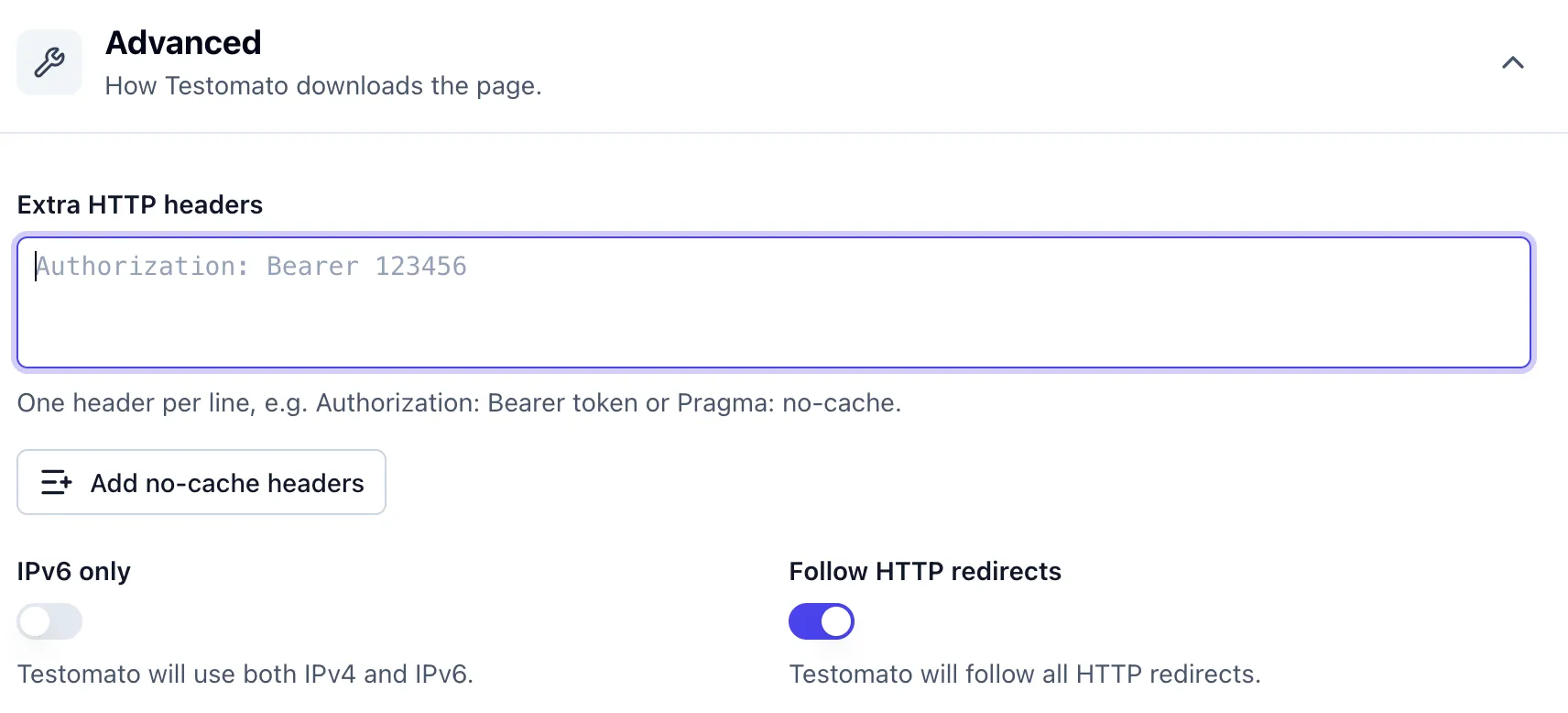
Accept
Accept lists the content types the client can understand. The server picks one through content negotiation and names its choice
in the Content-Type response header.
Accept: text/markdownSend it to check a version of a page that the server only returns for a specific type, such as Markdown for AI agents or JSON from an API. An Accept header in the extra headers replaces the check’s default.
API key headers
Many APIs expect a key in a custom request header. The name depends on the API, for example,
AWS API Gateway expects X-API-Key.
X-API-Key: your-api-keySend it to monitor an API endpoint the same way you monitor a page. Check the API’s documentation for the exact header name.
Authorization
Authorization carries credentials that give the client access to a protected resource. With Basic authentication, the value is Basic
followed by an encoded username:password.
Authorization: Basic dXNlcjpwYXNzd29yZA==Send it to monitor a staging site or another page behind HTTP authentication, so you can run the same checks there as on production. If several checks use the same credentials, set the header once on their Group.
Cache-Control
As a request header, Cache-Control asks caches between the check and your server how to handle the request.
Cache-Control: no-cacheA monitoring check can get a cached copy instead of the live page. “Cache busting” forces a fresh response, for example by sending
Cache-Control: no-cache as a request header, which asks caches to check with the origin server before reusing a stored response.
In Testomato, the “Add no-cache headers” button in the check editor adds a set of cache busting headers for you.
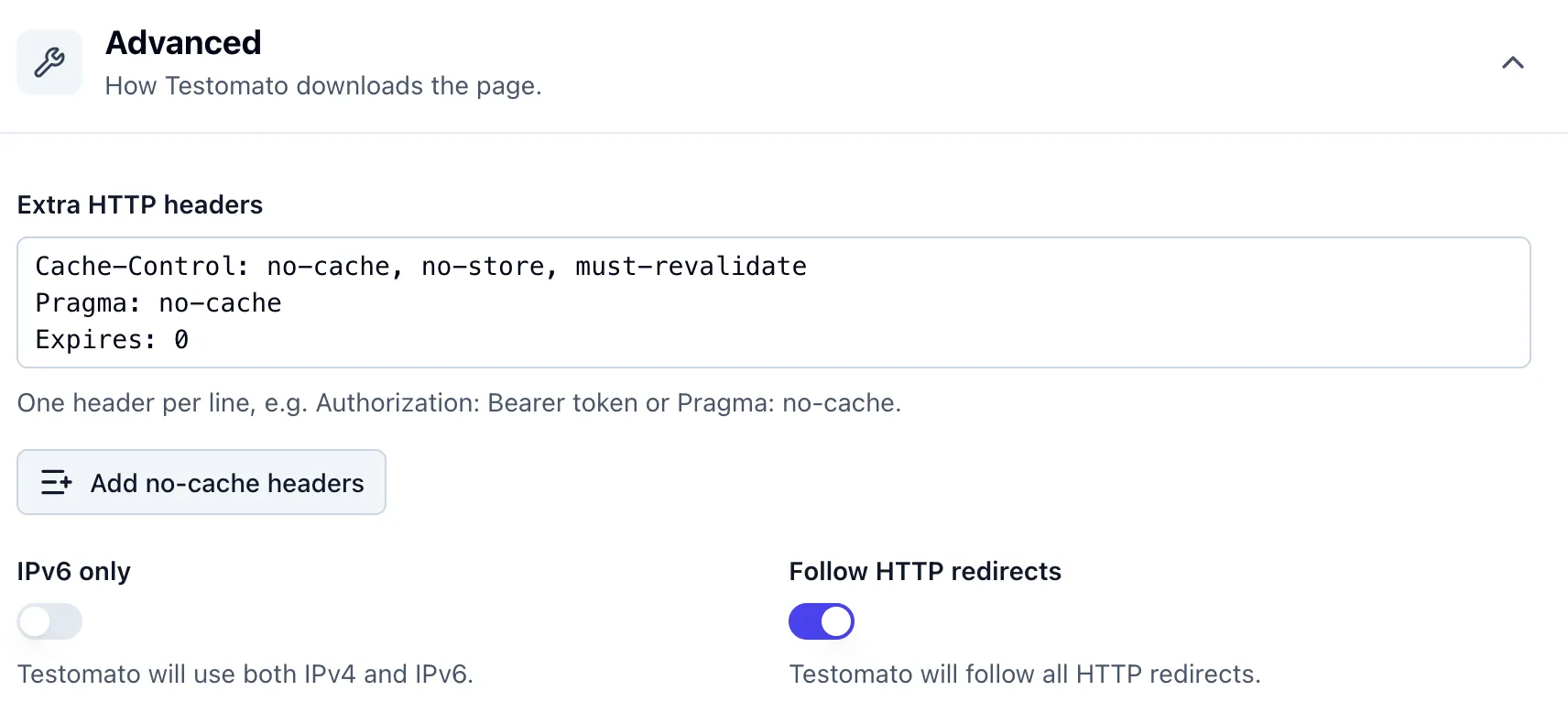
Cookie
Cookie sends cookies stored for the site, set earlier by the server with Set-Cookie or by JavaScript with document.cookie.
Cookie: session=abc123Send it when a page only shows certain content to visitors who have a specific cookie.
User-Agent
User-Agent identifies the application making the request. Testomato’s checks identify themselves as Testomatobot.
User-Agent: Testomatobot/1.0 (Linux x86_64; +https://testomato.com/bot) minicrawler/5.2.7Some servers and firewalls treat requests differently based on this header. Send a browser’s User-Agent to see the page your visitors see.
Monitoring headers with Testomato
This section shows how to set up header monitoring in Testomato. It starts with the use cases that already have dedicated checks, then walks through example checks for compression, HSTS, and an API with a bearer token.
If you just want to know which headers to watch, check the final section for a list of headers to monitor first.
Dedicated checks
Three of the use cases above have their own checks in Testomato, so you don’t need a generic HTTP Response Header check for them.
Content-Security-Policy: the CSP check and its per-directive checks read the policy from the header.
Redirects: the HTTP Redirect Location check asserts where a redirect points.
SEO: on the “Add check” page, after loading the page URL, you can use the SEO preset buttons to add a set of SEO checks,
including one for the X-Robots-Tag header.
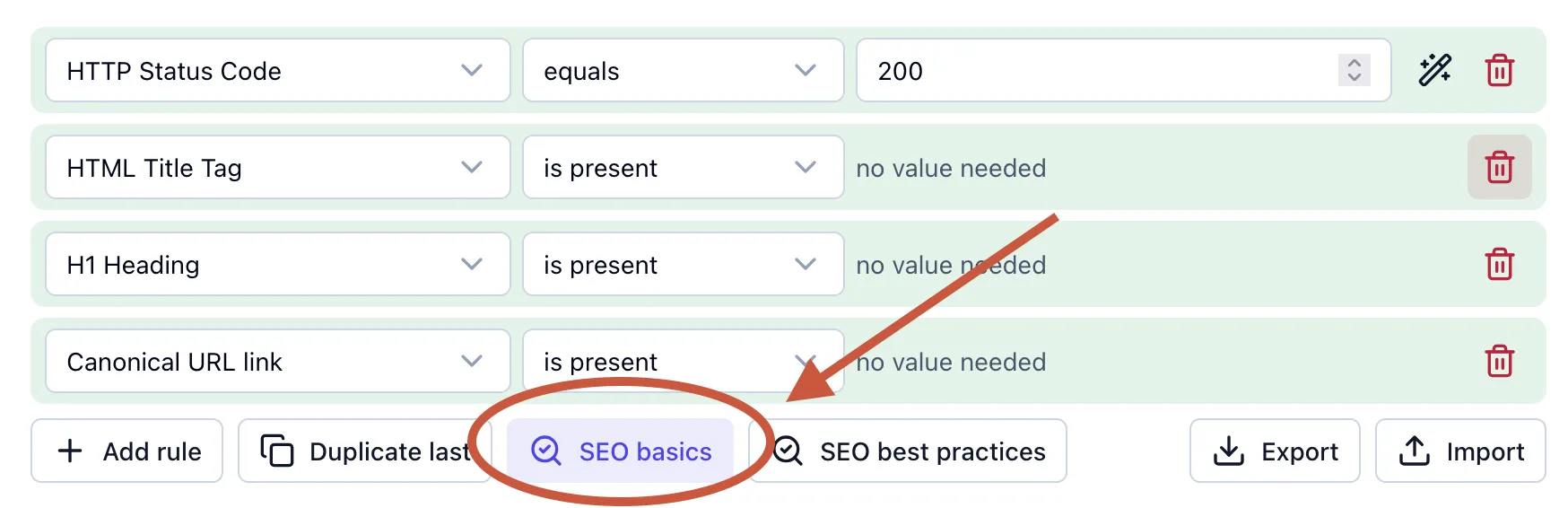
There are two robots-related checks that are included when you use the presets.

The Robots Meta & Link check does not match the following regex:
(?i)(?:\bnoindex\b|(?<![:\w-])(?<!preview:\s)\bnone\b)And the HTTP Response Header check does not match:
(?i)x-robots-tag:.*(?:\bnoindex\b|(?<![:\w-])(?<!preview:\s)\bnone\b)Both checks fail on noindex or none, which Google treats as noindex, nofollow. One looks in the robots meta tag,
the other in the X-Robots-Tag header.
Compression
testomato.com compresses its pages with gzip, so a check on the homepage can assert it by using an HTTP Response Header check that matches pattern:
(?i)^content-encoding: gzip 
Testomato’s checks tell the server they accept gzip, the format they can decompress, so expect gzip even if your server
sends Brotli (br) or something else.
HSTS
Our site sends strict-transport-security: max-age=31540000, so a check on the homepage can assert that HSTS stays on
by using an HTTP Response Header check that matches pattern:
(?i)^strict-transport-security: max-age=[1-9] 
Checking only that the header contains strict-transport-security isn’t sufficient, because max-age=0 turns HSTS off while the header
is still present. So we include [1-9] in our regex pattern to make the check fail on max-age=0.
API with a bearer token
Many APIs only answer requests that carry a token in the Authorization header. The Testomato API functions this way. It takes a personal access token as a bearer token.
To monitor an endpoint like this, add the token to the check’s Extra HTTP headers field:
Authorization: Bearer <your-token>Then add an HTTP Status Code check that equals 200, with the check pointed at an endpoint such as
https://testomato.com/api/project/{project-id}/simple-status.

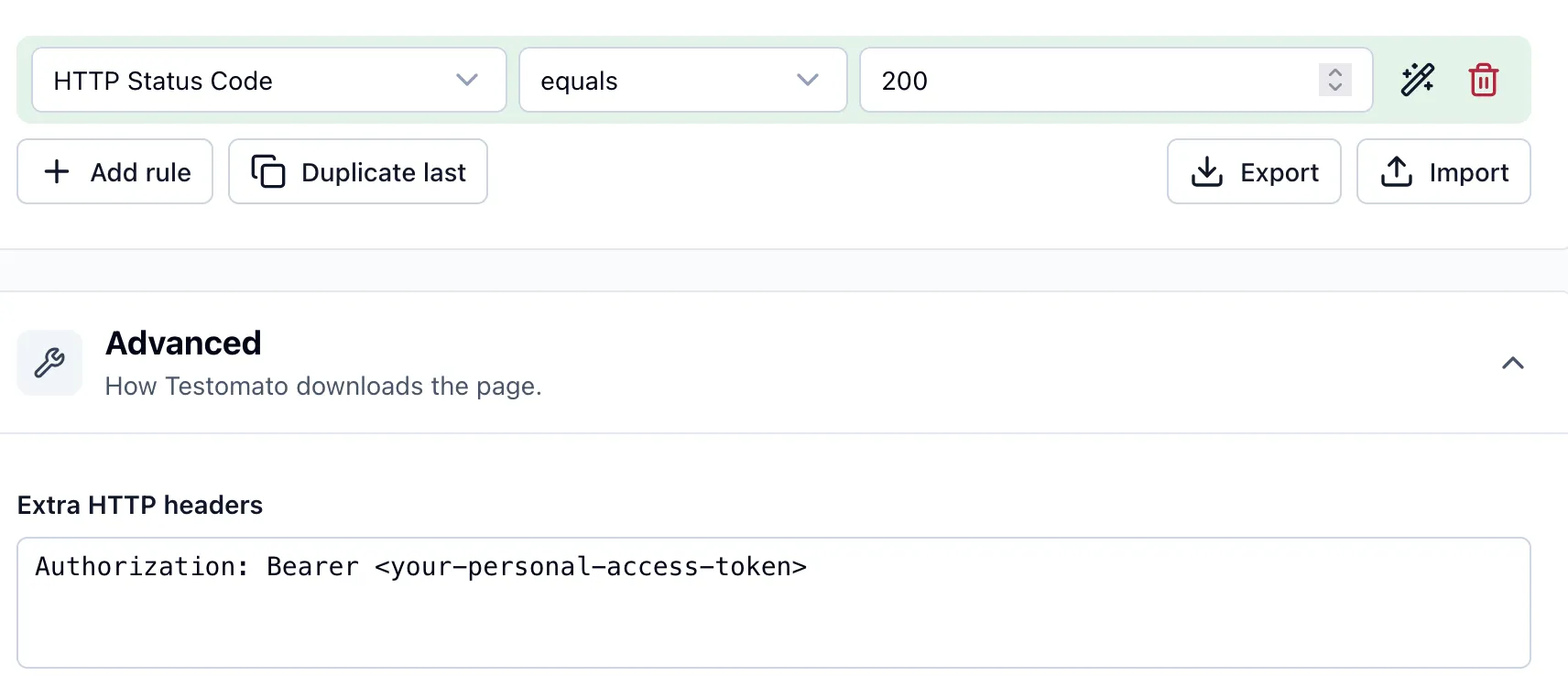
Without a valid token, the endpoint answers 401, so the check fails when the token expires or is revoked. The same setup works for any API that takes a bearer token.
What to monitor first
X-Robots-Tagwithoutnoindex, using the SEO basics preset.Content-Typewith the charset you expect.Locationon your key redirects, using the HTTP Redirect Location check.Content-EncodingandVary: Accept-Encodingon compressed pages.Cache-Controlon static assets.Content-Security-Policy, using the Content-Security-Policy check.- The security headers web.dev recommends for all websites.
Referrer-Policy, set explicitly.ServerandX-Powered-Bywithout version numbers.
Resources
- HTTP Observatory — MDN’s scanner that grades a site’s security headers
- HTTP Response Inspector — our tool that shows the status code and response headers for any URL
- http.dev — a reference covering HTTP headers, status codes, and related concepts
- OWASP Security Headers Cheat Sheet — recommended values for security headers
Monitor your HTTP response headers
14-day free trial. No credit card required.

Written by
Rudi Kraeher